Interactive Brokers Review 2026
Interactive Brokers is suitable for experienced traders, active investors, and long-term investors who value low fees and access to a wide range of markets.
- Interactive Brokers is trusted. Tested via live trading.
- Interactive Brokers №5 in the Forex brokers list
Highlights of Interactive Brokers

Interactive Brokers (IBKR) is a highly trusted broker offering a wide range of tradable global markets. It offers competitive pricing, high-quality research and education, and a modern suite of institutional-grade trading platforms.
Professional traders will appreciate the advanced trading tools and sophisticated order type configurations, although beginners may find these features overwhelming.
Advantages and disadvantages of Interactive Brokers
Pros
- High reliability and regulation by leading financial authorities.
- A wide range of financial instruments and access to more than 175 markets.
- Low trading commissions and favourable margin lending rates.
- Powerful trading platforms and professional analytical tools.
- A wide range of account types and high-quality educational materials.
Cons
- Complex interface and a steep learning curve for beginners.
- Inconsistent quality of technical support.
- Limited choice of deposit and withdrawal methods.
Interactive Brokers reviews

Interactive Brokers
What traders talk about
No reviews yet.
Leave a review of your experience:
Interactive Brokers Broker Overview
| Parameter | Interactive Brokers |
|---|---|
| Foundation Year | 1977 |
| Official Website | https://www.interactivebrokers.com |
| Regulated in Countries | United Kingdom, United States, Canada, Ireland, Australia, Hong Kong, India, Japan, Singapore, Switzerland More Details |
| Minimum Deposit |
|
| Spread | from 0.1 points |
| Max Leverage | 1:50 |
| Trading Assets |
|
| Trading Platforms |
|
| Email Support | |
| Hotline Phones | |
| Social Media |





Interactive Brokers (IBKR) is an American brokerage company whose history began in 1977. Its founder is Thomas Peterffy, one of the pioneers of electronic trading. The company initially engaged in market making and the development of automated trading systems. In 1993, the brokerage division Interactive Brokers was established, giving clients access to international financial markets. The company is headquartered in Greenwich, Connecticut, USA.
Today, Interactive Brokers is one of the largest international electronic brokers, serving retail investors, professional traders, investment funds, and financial institutions. The company provides access to trading in stocks, ETFs, bonds, options, futures, currencies, and other financial instruments across more than 170 markets worldwide. Its core activities are brokerage services, trade execution, asset custody, and the development of technology solutions for investing and portfolio management.
Interactive Brokers Review Summary
Reliability and Regulation
Interactive Brokers is highly reliable thanks to strict international regulation, substantial capital and mechanisms protecting client assets.
Advantages
- Regulation by SEC, FCA, ASIC and other reputable authorities.
- Strong financial stability and substantial capital.
- Segregation of assets and insurance protection for client accounts.
Disadvantages
- Regulatory fines in 2020 and 2025.
The rating of Interactive Brokers is based on a comprehensive analysis of reliability and regulation, trading conditions, commissions, available markets, platforms, and customer service quality. When assigning scores, we follow our own broker rating methodology, which enables objective comparisons of brokerage companies using consistent criteria.
Continue reading the review to learn more about the advantages, disadvantages, and trading capabilities of Interactive Brokers.
Reliability and Regulation
| Legal Entity | Regulator |
|---|---|


Interactive Brokers has a high level of reliability thanks to the group's nearly 50-year history, stable financial position, and strict international regulation.
The U.S. division of Interactive Brokers LLC is supervised by the SEC and the CFTC, and is also a member of FINRA and SIPC. The British company is regulated by the FCA, the Irish company by the Central Bank of Ireland (CBI), and the Australian company by ASIC.
Client assets are held separately from the broker's own funds, while U.S. accounts are protected by SIPC for up to $500 000, including up to $250 000 in cash. Additional insurance from Lloyd's of London increases coverage by up to $30 million per account, subject to established limits. Clients of the Irish division who meet the requirements are eligible for compensation of up to €20 000.
At the same time, the regulatory history of Interactive Brokers is not spotless. In 2020, the broker paid $38 million in settlements with U.S. regulators over violations of anti-money laundering requirements, and in 2025 — $11.8 million for violations of U.S. sanctions regimes. Despite these cases, Interactive Brokers remains one of the most reliable international brokers due to extensive regulation, substantial capital, and robust mechanisms for protecting client assets.
Account Opening
Interactive Brokers offers a fully online registration process with no mandatory minimum deposit, making account opening accessible and convenient. The process is well organized but requires completing a detailed questionnaire, providing financial information, and undergoing mandatory verification. Document checks may take several business days, especially if additional information is requested.
Registration
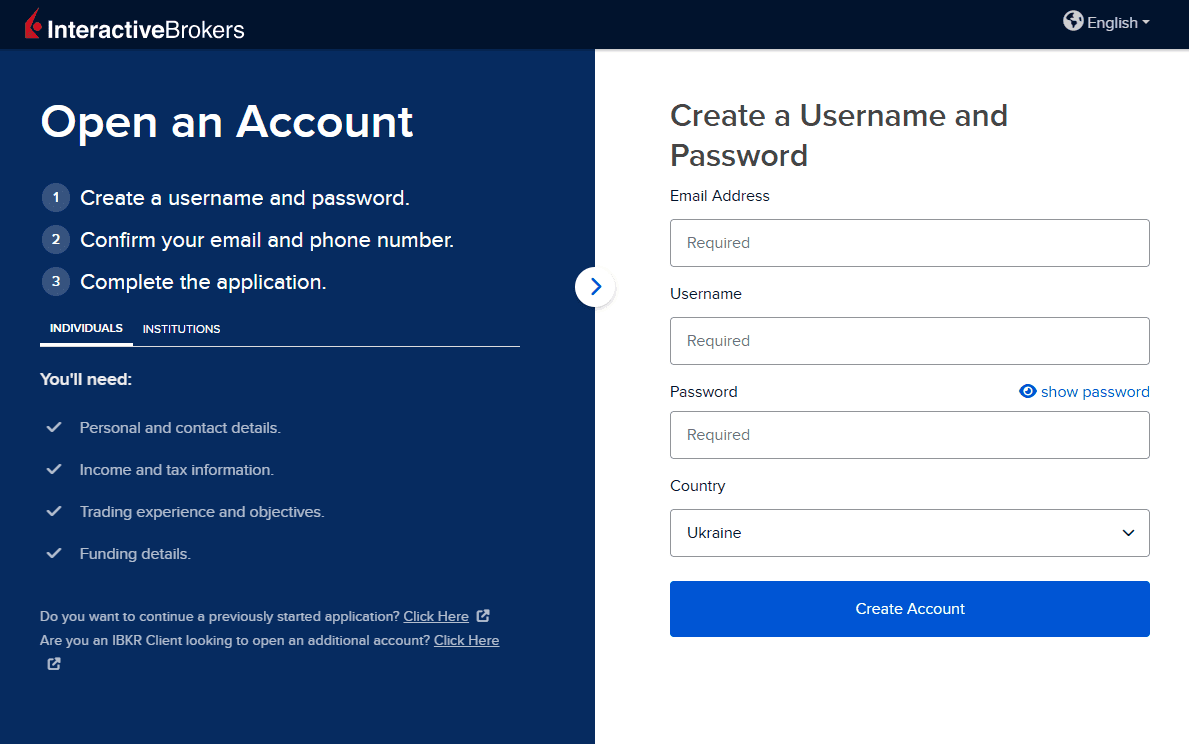
To open an account, go to the official website of Interactive Brokers and click the Open Account button. Registration consists of several steps:
- Create an account. Enter your email address, create a username and password, and confirm your email address.
- Choose an account type. Select an account format: individual (Individual), joint (Joint), or corporate (Institutional). Retail investors usually choose Individual.
- Enter personal details. Enter your full name, date of birth, citizenship, residential address, tax residence, and tax identification number.
- Provide financial information. Provide details about your employment, sources of income, capital, investment objectives, and trading experience.
- Configure trading conditions. Choose a cash (Cash) or margin (Margin) account, a base currency, and the required permissions to trade financial instruments.
- Confirm the application. Review the client agreement, electronically sign the required documents, and submit the application for review.
After the application is submitted, Interactive Brokers reviews the information provided. Access to individual financial instruments depends on investment experience, financial standing, and the results of the broker's eligibility review.
Verification
Interactive Brokers performs mandatory identity checks on clients in accordance with KYC (Know Your Customer) and AML (Anti-Money Laundering) requirements. The following documents may be required for verification:
- Proof of identity: a valid passport, national identity card, or driver's licence.
- Proof of residential address: a bank statement, utility bill, or another official document showing the client's name and address.
- Proof of source of funds: documents concerning income, employment, or the origin of capital if the broker requests additional information.
In some countries, Interactive Brokers uses automated identity verification, reducing the number of required documents. In other cases, they must be uploaded through the client account.
The duration of verification depends on the country of residence, the completeness of the information provided, and whether additional checks are required. If discrepancies are found, the broker may request clarification or additional documents.
Account base currency
Interactive Brokers supports multicurrency accounts and offers up to 23 base currencies, including:
- USD — U.S. dollar;
- EUR — euro;
- GBP — British pound;
- CHF — Swiss franc;
- CAD — Canadian dollar;
- AUD — Australian dollar;
- JPY — Japanese yen;
- SGD — Singapore dollar;
- HKD — Hong Kong dollar;
- PLN — Polish zloty.
The availability of specific base currencies depends on the servicing division of Interactive Brokers.
The base currency is used for reporting, calculating portfolio value, and determining margin requirements. Clients can still hold funds and conduct transactions in other supported currencies without having to convert all assets into the base currency.
If necessary, the base currency can be changed through Client Portal, subject to the restrictions of the specific account.
Minimum deposit
The minimum deposit at Interactive Brokers is $0 for standard individual and joint brokerage accounts. This means clients can open an account without a mandatory initial deposit.
The broker also does not charge a standard inactivity fee on these accounts. However, clients must have sufficient funds to purchase their chosen instruments and cover trading commissions.
Margin trading, certain financial instruments, and professional account types are subject to additional capital and collateral requirements.
Account Types
Interactive Brokers offers an exceptionally wide selection of accounts meeting the needs of beginner investors, active traders, professionals, and institutional clients. Cash, Margin, and Portfolio Margin accounts allow clients to select an appropriate level of risk and borrowing, while the IBKR Lite and Pro plans provide flexible trading conditions. Additional options for joint investing, retirement savings, and wealth management make the broker's offering one of the most versatile on the market.
Trading accounts
At Interactive Brokers, several forms of brokerage account ownership are available:
- Individual — an account for one owner who independently manages the investments.
- Joint — an account for two owners with joint access to and management of the assets.
- Trust — an account for managing assets in the interests of beneficiaries through a trustee.
The broker also offers specialized solutions for companies, investment advisers, funds, and asset managers. Tax-advantaged accounts are available in some countries, such as IRA in the U.S. and ISA in the UK.
However, the ownership structure does not determine the trading conditions. It is more important for investors to choose how funds are handled: Cash, Margin, or Portfolio Margin, if the latter is available in their jurisdiction.
| Parameter | Cash | Margin (Reg T) | Portfolio Margin |
|---|---|---|---|
| Account Currency | USD, EUR, GBP, CHF, AUD, NZD, JPY, SEK, NOK, PLN, CZK, HUF, DKK, HKD, SGD, ILS, CAD, AED, CNY, MXN, TRY, ZAR, INR | USD, EUR, GBP, CHF, AUD, NZD, JPY, SEK, NOK, PLN, CZK, HUF, DKK, HKD, SGD, ILS, CAD, AED, CNY, MXN, TRY, ZAR, INR | USD, EUR, GBP, CHF, AUD, NZD, JPY, SEK, NOK, PLN, CZK, HUF, DKK, HKD, SGD, ILS, CAD, AED, CNY, MXN, TRY, ZAR, INR |
| Minimum Deposit | $1 | $1 | $1 |
| Spread | from 0.1 pips~ 0.6 pips | from 0.1 pips~ 0.6 pips | from 0.1 pips~ 0.6 pips |
| Commission per Trade | $2.00 | $2.00 | $2.00 |
| Leverage | 1:1 | 1:1-1:50 | 1:1-1:50 |
| Order Execution | DMA | DMA | DMA |
| Trading Platforms | IBKR Mobile, Trader WorkStation (TWS), IMPACT, IBKR Desktop, Client Portal, GlobalTrader | IBKR Mobile, Trader WorkStation (TWS), IMPACT, IBKR Desktop, Client Portal, GlobalTrader | IBKR Mobile, Trader WorkStation (TWS), IMPACT, IBKR Desktop, Client Portal, GlobalTrader |
| Trading Assets | Options, Commodities, Futures, ETF, Stocks, Indices, Cryptocurrency, Bonds, Forex | ETF, Stocks, Indices, Cryptocurrency, Bonds, Options, Commodities, Forex, Futures | ETF, Stocks, Indices, Cryptocurrency, Bonds, Options, Commodities, Forex, Futures |
| Margin Call / Stop Out | No data | No data | No data |
| Opened Positions | — | — | — |
| Demo Account | Yes | Yes | Yes |
| Islamic Account | No | No | No |
The main difference between these accounts is whether borrowed funds can be used and how margin is calculated. Trading commissions, available instruments, and trading platforms depend on the selected pricing plan, country of residence, and trading permissions, not only on the account type.
Demo account
Interactive Brokers offers free demo access for exploring its trading platforms and testing investment strategies without risking real money.
New users can access a Free Trial — trial access to the Trader Workstation (TWS), IBKR Desktop and IBKR Mobile platforms. It allows users to explore the interface, try different order types, and assess the capabilities of trading tools without opening real positions.
Clients of Interactive Brokers also have access to Paper Trading — a simulated account for testing strategies under conditions that approximate the real market. Key features include:
- Virtual trading capital — usually $1 000 000.
- Support for various financial instruments, order types, and trading strategies.
- Ability to use TWS, IBKR Mobile and Client Portal.
- Access to market data in accordance with subscription terms and the selected mode.
In the free trial, most market quotes are delayed by 10–15 minutes. In addition, the execution of virtual trades may differ from real trading due to the way liquidity, slippage, and order execution are simulated.
The demo account is particularly useful for beginner investors who need to learn the fairly sophisticated trading platforms of Interactive Brokers, as well as for experienced traders wishing to test strategies in advance.
Cash, Reg T, and Portfolio Margin
Interactive Brokers offers several trading modes that determine the rules for using clients' own and borrowed funds.
Cash account
Cash is intended for investors who prefer to trade primarily with their own funds without margin financing. Sufficient available cash is required to purchase assets.
A Cash account does not allow conventional short positions in stocks or margin borrowing. This format is suitable for beginner investors and those who follow a long-term strategy and do not want to increase risk through leverage.
Margin / Reg T account
A margin account allows clients to use funds borrowed from the broker, open short positions in permitted instruments, and apply more sophisticated trading strategies.
Standard margin trading through the U.S. division of Interactive Brokers requires equity of at least $2 000. Under Regulation T rules, eligible U.S. stocks generally have an initial margin requirement of 50% of the position's value, although intraday requirements may differ.
Different margin calculation systems apply to clients outside the U.S., so the available leverage depends on the country, financial instrument, and requirements of the servicing division.
Portfolio Margin
Portfolio Margin is designed for experienced traders with large portfolios. Unlike standard Reg T, margin requirements are calculated based on the portfolio's aggregate risk, including correlations between assets and potential changes in market prices.
Opening a Portfolio Margin account with the U.S. division requires equity of at least $110 000. If the value of assets falls below $100 000, standard Reg T requirements apply.
Portfolio margin may enable more efficient use of capital in diversified strategies. However, collateral requirements may be stricter for concentrated and high-risk portfolios.
Interactive Brokers monitors compliance with margin requirements in real time. If collateral is insufficient, the broker may forcibly close positions without a prior margin call. Margin trading therefore requires continuous risk monitoring.
IBKR Lite and IBKR Pro
In addition to account types, Interactive Brokers offers two pricing plans — IBKR Lite and IBKR Pro. They differ primarily in trading commissions, order-routing mechanisms, and service terms.
Feature | IBKR Lite | IBKR Pro |
|---|---|---|
Primary audience | Retail investors | Active traders and investors |
Availability | Eligible clients in the U.S. and Singapore | International clients |
U.S. stocks and ETFs | Commission of $0 on eligible trades | Fixed or tiered commissions |
Other instruments | Commissions based on IBKR rates | Fixed or tiered commissions |
Order routing | Standard Lite routing | IB SmartRouting |
Minimum deposit | $0 | $0 |
Inactivity fee | $0 | $0 |
IBKR Lite is aimed at retail investors who primarily buy stocks and ETFs traded on U.S. exchanges. The main advantage of the plan is the absence of brokerage commissions on eligible trades in these instruments. Standard charges may apply to other products and certain transactions.
IBKR Pro is designed for investors and active traders who value flexible pricing and professional order execution. Clients can use fixed (Fixed) or tiered (Tiered) commissions. The IB SmartRouting system helps select trading venues based on price and available liquidity.
IBKR Lite is not available in every country. In August 2025, the broker expanded the plan to Singapore. For most international clients, the main option remains IBKR Pro.
Commissions
Interactive Brokers offers competitive trading commissions, especially for active traders and investors dealing in large volumes. Trading costs depend on the financial instrument, market, selected pricing plan, and monthly trading volume. Fixed and tiered commissions are available for most products, allowing clients to choose terms that suit their trading strategy.
Non-trading costs include fees for certain withdrawal methods, market data subscriptions, and additional services. However, Interactive Brokers does not charge standard account opening or inactivity fees for a regular brokerage account.
Trading commissions
Interactive Brokers offers two pricing plans: IBKR Lite and IBKR Pro.
IBKR Lite allows eligible clients from the U.S. and Singapore to trade certain U.S. stocks and ETFs without brokerage commissions. Standard rates apply to other instruments. The availability of commission-free trades and specific restrictions depends on the servicing division.
IBKR Pro is available to international clients and provides two main commission models:
- Fixed commission — a rate per share or contract, or a percentage of the transaction value. Depending on the instrument and market, some third-party charges may be payable separately.
- Tiered commission — the rate decreases as monthly trading volume increases. Exchange, clearing, and regulatory charges may be applied separately.
Tiered is often more cost-effective for active traders because commissions decrease as trading volume increases. Fixed is more convenient for investors who prefer a more predictable cost structure.
Commissions on stocks and ETFs
Interactive Brokers offers low commissions on trading stocks and ETFs on U.S., European, and Asian exchanges. Both pricing models are available to IBKR Pro clients, and the commission amount depends on the trading venue and order parameters.
In the U.S., the IBKR Pro Fixed plan charges $0.005 per share, with a minimum of $1 per order and a maximum of 1% of the transaction value. Under the Tiered model, the initial rate is $0.0035 per share and may decrease to $0.0005 at high monthly volumes.
Comparison of commissions on U.S. stocks and ETFs:
Parameter | IBKR Lite | IBKR Pro Fixed | IBKR Pro Tiered |
|---|---|---|---|
Commission per share | $0 | $0.005 | $0.0005–0.0035 |
Minimum commission | $0 | $1 | $0.35 |
Maximum commission | $0 | 1% of the trade | 1% of the trade |
Additional fees | Regulatory fees may apply | Regulatory fees may apply | Exchange, clearing, and regulatory fees |
IBKR Lite's zero commission applies only to eligible trades. Different terms apply to certain over-the-counter instruments, low-priced stocks, and special transactions.
Below are examples of standard IBKR Pro Fixed commissions in international markets.
Market | Commission | Minimum |
|---|---|---|
United States | $0.005 per share | $1 |
Canada | CA$0.01 per share | CA$1 |
United Kingdom | 0.05% | £3 |
Germany | 0.05% | €3 |
France | 0.05% | €3 |
Spain | 0.05% | €3 |
Netherlands | 0.05% | €3 |
Poland | 0.10% | 15 PLN |
Norway | 0.05% | 49 NOK |
Australia | 0.08% | AU$6 |
Hong Kong | 0.08% | HK$18 |
Japan | 0.08% | ¥80 |
India | 0.01% | ₹6 |
The table provides basic examples of Fixed pricing for the relevant venues. For European markets, the terms shown mainly apply to IB SmartRouting. Rates may differ for direct routing, other venues, and specific categories of securities. Taxes and mandatory market fees are charged separately where specified by the pricing plan.
For example, purchasing 100 US shares priced at $50 each will cost an IBKR Pro Fixed client $1 in brokerage commission. When purchasing 1 000 shares, the commission will be $5.
Interactive Brokers also supports trading in fractional shares and ETFs. This is convenient for investors with limited capital who do not need to buy a whole share of an expensive company.
IBKR Pro clients can use the IB SmartRouting system, which analyzes available trading venues and routes orders based on price and execution opportunities.
Margin rates
In addition to standard trading commissions, Interactive Brokers charges interest on borrowed funds used for margin trading.
The margin rate depends on the loan currency, the outstanding balance, and the selected pricing plan. IBKR Pro uses a tiered system: the larger the loan, the lower the interest markup over the benchmark rate.
Loan currency | Annual rate |
|---|---|
USD | about 5.38% |
EUR | about 4.05% |
GBP | about 5.30% |
Interest rates are variable and may change in line with the benchmark rates for the corresponding currencies.
The following IBKR Pro tiers apply to US dollar loans:
Outstanding balance | Annual rate |
|---|---|
Up to $100 000 | 5.38% |
$100 000–1 million | 4.88% |
$1–50 million | 4.63% |
Over $50 million | 4.38% |
Rates apply to the corresponding balance tiers, rather than one rate applying to the entire loan.
For IBKR Lite, the rate on dollar-denominated loans is higher: for eligible US accounts, it is around 6.38% per year.
Forex commissions
Interactive Brokers uses a commission-based model for trading in the foreign exchange market. Instead of applying a standard fixed markup to the spread, the broker charges a commission for executing a currency trade.
The commission starts at 0.20 basis points (0.002%) of the trade value and decreases as monthly trading volume increases.
Monthly trading volume | Commission | Minimum per order |
|---|---|---|
Up to $1 billion | 0.20 basis points | $2 |
$1–2 billion | 0.15 basis points | $1.50 |
$2–5 billion | 0.10 basis points | $1.25 |
Over $5 billion | 0.08 basis points | $1 |
The commission is charged separately for buying and selling currency. For example, when opening and subsequently closing a EUR/USD position with a nominal value of $100 000, a trader will pay approximately $4 for the round trip, excluding the spread and exchange-rate changes.
This is a fairly low commission compared with most ECN brokers, whose average commission is $3–3.5 per lot per side, or $6–7 for a round trip. As a result, Interactive Brokers' Forex trading costs may be substantially lower.
| Broker | FP MarketsRaw | LibertexMT5 Market | Interactive BrokersMargin (Reg T)Current broker | VantageRaw | EightcapRaw |
|---|---|---|---|---|---|
| Commission | per 1 lot$3.00 | per 1 lot$3.00 | per 1 lot$2.00 | per 1 lot$3.00 | per 1 lot$3.50 |
However, the minimum commission of $2 per order makes small trades relatively more expensive. For example, on a $10 000 transaction, the minimum commission will still be $2 per side, which noticeably increases the relative cost.
Mutual fund commissions
Interactive Brokers provides access to tens of thousands of mutual funds from the United States and other countries. Many of them can be purchased without a transaction fee.
Transaction costs depend on the fund, its country of registration, and the intermediary through which the purchase is made.
Fund category | Commission |
|---|---|
US no-transaction-fee funds (NTF) | $0 |
Other US funds | The lesser of 3% of the trade value or $14.95 |
Non-US funds through Allfunds, denominated in GBP | £4.95 |
Non-US funds through Allfunds in other currencies | €4.95 or equivalent |
European funds through Euronext Fixed | 0.10%, minimum €4, maximum €29 |
Funds through FundSettle | €5 or €19 depending on the pricing model |
Individual investment funds may charge their own fees for management, early redemption of units, and other transactions. These costs are not included in Interactive Brokers' standard brokerage commission.
The minimum purchase amount is also determined by the terms of the specific fund. For example, for certain transactions through FundSettle, the initial order must be at least $3 000, while subsequent orders must be at least $100.
Bond commissions
Interactive Brokers offers trading in government, municipal, and corporate bonds. Commissions are calculated based on the face value or market value of the trade and the type of bond.
The following pricing structure applies to US bonds:
Bond type | Commission | Minimum |
|---|---|---|
Corporate bonds and certificates of deposit (CD), first $10 000 of face value | 0.10% | $1 |
Corporate bonds and certificates of deposit (CD), amount over $10 000 | 0.025% | — |
Municipal bonds, first $10 000 of face value | 0.05% | $1 |
Municipal bonds, amount over $10 000 | 0.0125% | — |
U.S. Treasury bonds, first $1 million of face value | 0.002% | $5 |
U.S. Treasury bonds, amount over $1 million | 0.0001% | — |
For U.S. corporate bonds, the maximum commission is capped at the lower of $250 or 1% of the trade value. For municipal bonds, the corresponding cap is $125 or 1% of the trade value.
For example, purchasing U.S. Treasury bonds with a face value of $100 000 will incur a $5 brokerage commission due to the minimum fee. At a face value of $1 million, the commission will be $20.
Different rates apply to European and Asian markets.
Market and instrument | Commission | Minimum |
|---|---|---|
Europe — Euronext bonds, trades up to €50 000 | 0.10% | €2 |
Europe — Euronext, portion of the trade from €50 000 to €5 million | 0.035% | €2 |
Europe — Euronext, portion of the trade over €5 million | 0.015% | €2 |
Hong Kong — government bonds, Fixed | 0.08% | HK$18 |
Australia — exchange-traded Treasury bonds, Fixed | 0.08% | AU$6 |
Additional exchange, regulatory and other fees may apply to certain transactions.
Options commissions
Commissions charged by Interactive Brokers for options depend on the trading venue, contract type, premium amount and monthly trading volume.
In the U.S., IBKR Pro offers two pricing options. Under Fixed, the standard commission is $0.65 per contract. Under Tiered, the rate may decrease from $0.65 to $0.15 per contract.
For U.S. options with a monthly volume of up to 10 000 contracts, the following Tiered rates apply:
Option premium amount | Commission per contract |
|---|---|
Less than $0.05 | $0.25 |
From $0.05 to $0.10 | $0.50 |
From $0.10 | $0.65 |
As monthly trading volume increases, the commission may decrease:
Monthly volume | Commission |
|---|---|
Up to 10 000 contracts | $0.25–0.65 depending on the premium |
10 001–50 000 | $0.25–0.50 |
50 001–100 000 | $0.25 |
From 100 001 | $0.15 |
The minimum commission for a regular order is $1.
Separate rates apply in other markets.
Market and instrument | Tiered commission | Fixed |
|---|---|---|
U.S. — standard options | $0.15–0.65 | $0.65 |
Canada — options | CA$1–1.25 | Depends on the terms |
France — index options | €0.25–0.90 | €1.50 |
Germany — standard index options | €0.25–0.90 | From €1.50 |
Netherlands — index options | €0.25–0.90 | €1.50 |
Rates depend on the option type and trading venue; the table provides examples of the main contract categories.
Under Tiered, additional exchange, clearing and regulatory fees may increase the total cost of a trade. In some cases, exchange rebates for providing liquidity may partially offset the brokerage commission.
Futures commissions
Interactive Brokers offers trading in futures and options on futures on international exchanges. Commissions depend on the trading venue, contract type and monthly number of trades.
The following scale applies to standard U.S. futures denominated in U.S. dollars:
Monthly volume | IBKR Pro Tiered | IBKR Pro Fixed |
|---|---|---|
Up to 1 000 contracts | $0.85 | $0.85 |
1 001–10 000 | $0.65 | $0.85 |
10 001–20 000 | $0.45 | $0.85 |
Over 20 000 | $0.25 | $0.85 |
Base rates do not necessarily reflect the full cost of a trade. Additional exchange, clearing, regulatory and separate position-holding fees may apply.
Separate commissions apply to special contracts.
Instrument | Initial commission per contract |
|---|---|
Standard U.S. futures in USD | $0.85 |
U.S. E-micro Futures | $0.25 |
CME Bitcoin Futures (BRR) | $5 |
CME Micro Bitcoin Futures (MBT) | $0.85 |
Canada — standard futures, Fixed | CA$2.40 |
Germany — standard Eurex futures, Fixed | €2 |
Germany — Micro DAX, Fixed | €0.40 |
United Kingdom — standard futures in GBP, Fixed | £1.70 |
Commissions are shown per side of the trade. When a position is opened and subsequently closed, the brokerage commission is charged twice.
For example, trading one standard U.S. futures contract with a commission of $0.85 per side will result in brokerage costs of $1.70 for a round trip, excluding additional fees.
The Tiered model is particularly attractive to active traders, as it allows costs to decrease when trading large numbers of contracts. However, the total trading cost depends on the specific exchange.
Commissions on CFDs
Interactive Brokers offers CFDs on stocks, stock indices, currencies, oil and precious metals, depending on the country of residence and servicing entity.
Commissions on CFDs vary by the type of underlying asset. A tiered model applies to stocks, predominantly fixed rates apply to stock indices and oil, while currency CFDs use rates based on trading volume.
In addition to the trading commission, spreads and financing costs for positions held for several days must be taken into account.
Stock CFDs
Interactive Brokers calculates commissions on stock CFDs based on monthly trading volume. Rates may decrease as trading volume increases.
For U.S. stock CFDs, the initial commission is $0.005 per share, with a minimum fee of $1 per order.
Examples of rates for the initial trading-volume tier:
Market | Commission | Minimum |
|---|---|---|
US | $0.005 per share | $1 |
Europe — shares denominated in EUR | 0.05% | €3 |
United Kingdom — shares denominated in GBP | 0.05% | £3 |
Czech Republic | 0.17% | 60 CZK per execution + 10 CZK per order |
Brazil | 0.12% | R$15 |
South Africa | 0.12% | R50 |
Australia | 0.05% | AU$5 |
Hong Kong | 0.05% | HK$12 |
Japan | 0.03% | ¥100 |
Singapore | 0.11% | SG$2.50 |
The rates shown apply to the minimum monthly trading volume. Mandatory taxes and fees are charged additionally in certain markets.
For example, opening a CFD position on European shares worth €20 000 at a commission rate of 0.05% will cost €10.
Holding a leveraged position incurs additional interest costs. Therefore, CFDs may be convenient for active trading, but require careful cost calculations when held long term.
Index CFDs
For stock index CFDs, Interactive Brokers charges a fixed commission calculated as a percentage of the trade's nominal value. A minimum commission per order also applies.
Index | Commission | Minimum |
|---|---|---|
US 500 | 0.005% | $1 |
US 30 | 0.005% | $1 |
US Tech 100 | 0.010% | $1 |
UK 100 | 0.005% | £1 |
EURO 50 | 0.010% | €1 |
GERMANY 40 | 0.005% | €1 |
FRANCE 40 | 0.010% | €1 |
SPAIN 35 | 0.010% | €1 |
NETHERLANDS 25 | 0.010% | €1 |
SWITZERLAND 20 | 0.010% | CHF 1 |
JAPAN 225 | 0.010% | ¥40 |
HONG KONG 50 | 0.010% | HK$10 |
AUSTRALIA 200 | 0.010% | AU$1 |
For example, a US 500 index CFD trade with a nominal value of $20 000 will incur $1 in commission.
It is important to note that trading costs are not limited to commission alone. Quotes for index CFDs may include spreads from liquidity providers, and financing costs arise when a position is held overnight.
Metal CFDs
Interactive Brokers offers trading in gold and silver instruments, with commissions depending on order size. The following rates apply to small trades:
Metal | Order size | Commission | Minimum |
|---|---|---|---|
Gold | Up to $500 000 | 0.015% | $2 |
Gold | $500 000–1 million | 0.010% | — |
Gold | Over $1 million | 0.007% | — |
Silver | Up to $250 000 | 0.030% | $2 |
Silver | $250 000–500 000 | 0.020% | — |
Silver | Over $500 000 | 0.015% | — |
Rates depend on the transaction amount and applicable pricing tier. For example, when buying gold worth $10 000 at a rate of 0.015%, the calculated commission will be $1.50, but due to the minimum fee, the client will pay $2.
In addition to trading commissions, financing and metal storage costs may arise depending on the instrument used.
Cryptocurrency fees
Interactive Brokers provides access to the cryptocurrency market in several ways: through direct spot trading, cryptocurrency futures, exchange-traded products (ETP) and shares of companies associated with digital assets.
Spot cryptocurrency trading is conducted through partners Paxos Trust Company and Zero Hash. Trading availability depends on jurisdiction and whether the client meets the partner platform's requirements.
Fees for spot trades range from 0.12% to 0.18% of the transaction value.
Monthly trading volume | Commission |
|---|---|
Up to $100 000 | 0.18% |
$100 000–1 million | 0.15% |
Over $1 million | 0.12% |
The minimum commission is $1.75 per order, but is capped at 1% of the trade value.
For example, purchasing Bitcoin worth $5 000 at a rate of 0.18% will incur $9 in commission. No additional markup on the market spread is applied by Interactive Brokers, although the actual execution price still depends on market liquidity.
Paxos also charges a monthly fee of $0.15 per open account. Cryptocurrencies are held in custody by partners, and the cryptocurrency assets themselves are not protected under the SIPC program.
Cryptocurrency futures are available through regulated futures exchanges, including CME.
Instrument | Base commission per contract |
|---|---|
CME Bitcoin Futures | $5 |
CME Micro Bitcoin Futures | $0.85 |
When using Tiered, commissions may decrease as trading volume increases. Exchange and regulatory fees are charged separately.
In addition, through Interactive Brokers investors can buy cryptocurrency exchange-traded products (ETP) and ETFs. Commissions for these are calculated according to the rates of the relevant stock market, and the products themselves may have annual management expenses.
Asset management fees
Interactive Brokers offers access to automated investment portfolio management through the service Interactive Advisors. It is aimed at investors who prefer to delegate portfolio construction and rebalancing to professional managers or automated strategies.
The annual fee depends on the selected portfolio and is from 0.10% to 0.75% of the value of assets under management.
Portfolio type | Annual fee |
|---|---|
Portfolios from WisdomTree ETF and State Street | 0.10% |
Smart Beta and Asset Allocation | 0.20% |
Socially responsible portfolios | 0.20% |
Third-party manager portfolios | 0.25–0.75% |
The fee is calculated daily based on the value of assets in the portfolio and charged monthly.
For example, when investing $20 000 in a portfolio with an annual fee of 0.20%, management costs will be approximately $40 per year, assuming the asset value remains unchanged.
The minimum investment amount depends on the selected strategy. Some portfolios are available from $100, while specialized solutions may require several thousand or tens of thousands of dollars.
Interactive Advisors does not charge a separate standard commission for trades in managed portfolios. However, the expenses of the ETFs and investment funds included in the portfolio are accounted for separately.
The service is suitable for investors who want to use ready-made strategies and professional management without selecting each security themselves. The availability of Interactive Advisors depends on the service's requirements and the client's jurisdiction.
Non-trading fees
Interactive Brokers has relatively low non-trading fees. The broker does not charge a standard fee for opening or maintaining an individual account or for a lack of trading activity.
The main non-trading costs are shown in the table.
Service | Fee |
|---|---|
Opening a standard brokerage account | $0 |
Account inactivity | $0 |
Standard deposit by bank transfer | $0 charged by IBKR |
First two withdrawals in a calendar month | $0 charged by IBKR |
Subsequent withdrawals in USD via Wire | $10 |
Subsequent withdrawals in USD via ACH/EFT | $1 |
Subsequent withdrawals in EUR by bank transfer | €8 |
Subsequent withdrawals in EUR via SEPA | €1 |
Subsequent withdrawals in GBP by bank transfer | £7 |
Subsequent withdrawals in GBP via BACS | £1 |
Subsequent withdrawals in PLN by bank transfer | 40 PLN |
Interactive Brokers allows the free submission of two withdrawal requests in a calendar month. Starting with the third request, a fee applies depending on the currency and transfer method.
Correspondent and recipient banks may also charge their own fees, which are not included in the fees charged by Interactive Brokers.
Additional non-trading costs include:
- Market data. Separate subscriptions to real-time quotes, exchange order books, and professional data are available for a fee. The cost depends on the exchange and the client's status.
- Currency conversion. Forex fees apply to manual currency conversion, while special terms may apply to automatic conversion.
- Securities transfers. Some types of asset transfers between brokers, depositories, or record-keeping systems incur additional costs.
- Special services. Fees may be charged for certain corporate actions, physical delivery, document processing, and other non-standard transactions.
Overall, the non-trading fees charged by Interactive Brokers remain moderate. The absence of an inactivity fee and the two free withdrawals per month are especially beneficial for long-term investors who trade infrequently and periodically deposit or withdraw capital. The main additional costs relate to professional market data, international transfers, and specialized services.
Deposit and Withdrawal
Interactive Brokers offers reliable deposit and withdrawal methods, including bank transfers, Wise, and stablecoin transactions for certain client categories. No deposit fee and two free withdrawals per month make the service cost-effective, while most transactions are processed within a reasonable time. However, the lack of direct deposits by bank card and popular e-wallets, as well as possible delays with international transfers, somewhat limits the convenience of payment transactions.
Account funding methods
Interactive Brokers does not charge a standard fee for funding a brokerage account. However, banks, payment intermediaries, and currency conversion providers may charge their own fees.
The broker supports the following deposit methods:
| Payment System | Currencies | Deposit Fee | Operation Limit |
|---|---|---|---|
| Bpay | AUD | 0% | — |
| USDEURGBP | 0% | — | |
| Swift | AEDILSCNY | 0% | — |
| Automated Clearing House (ACH) | USD | 0% | — |
| SEPA | EUR | 0% | — |
| Online banking | USD | 0% | — |








| Cryptocurrency | Blockchain | Deposit Fee | Operation Limit |
|---|---|---|---|
| USDC (USD Coin) | ERC20 | 0% | — |

In January 2026, Interactive Brokers launched the option to fund a brokerage account using the stablecoin USDC, and later expanded support to RLUSD and PYUSD. Transfers are made through the zerohash infrastructure, and the stablecoins received are automatically converted into U.S. dollars and credited to the brokerage account.
This deposit method is available 24 hours a day, including weekends and holidays, and funds usually arrive within a few minutes. Interactive Brokers does not charge its own fee for stablecoin deposits, but the zerohash provider charges a conversion fee, and the blockchain network may charge an additional fee.
For most clients, bank transfers remain the main deposit method. An international transfer usually takes one to three business days, although the actual time depends on the sending bank, the currency, and any additional checks. Local transfers may be processed faster.
How to fund an account with Interactive Brokers
- Log in to Client Portal.
- Go to the section Transfer & Pay → Transfer Funds → Deposit Funds.
- Select the deposit currency and an available payment method.
- Enter the amount and the required payment details.
- Obtain the payment details or transfer instructions.
- Send the funds through your bank or the selected payment service.
It is important to note that creating a deposit notification in Client Portal does not transfer the money by itself. If a bank transfer is selected, the client must initiate the payment through their bank.
Interactive Brokers generally accepts deposits from accounts belonging to the brokerage account holder. Third-party transfers may be rejected under anti-money laundering requirements.
Withdrawal methods
Interactive Brokers allows money to be withdrawn from a brokerage account through bank transfers, local payment systems, Wise, and supported stablecoins. The available options depend on the client's country of residence and servicing entity.
| Payment System | Currencies | Withdrawal Fee | Operation Limit |
|---|---|---|---|
| Bpay | AUD | 0% | — |
| USDEURGBP | 0% | — | |
| Swift | USDEURGBP | 0% | — |
| Automated Clearing House (ACH) | USD | 0% | — |
| SEPA | EUR | 0% | — |
| Online banking | USD | 1.5% | — |
| Cryptocurrency | Blockchain | Withdrawal Fee | Operation Limit |
|---|---|---|---|
| USDC (USD Coin) | ERC20 | 0% | — |
Since July 2026, Interactive Brokers has supported withdrawals via stablecoins to external cryptocurrency wallets. Clients can convert an available dollar balance into a supported stablecoin and send it to the specified address. These transfers are processed 24 hours a day and usually take a few minutes to complete. Availability and fees depend on the cryptocurrency provider's terms.
Interactive Brokers provides two free withdrawal requests in a calendar month. Starting with the third withdrawal, fees apply depending on the currency and selected payment method.
Examples of fees for subsequent bank withdrawals:
Withdrawal method | Fee |
|---|---|
Wire Transfer (USD) | $10 |
ACH (USD) | $1 |
Bank transfer (EUR) | €8 |
SEPA (EUR) | €1 |
Bank transfer (GBP) | £7 |
BACS (GBP) | £1 |
Bank transfer (PLN) | 40 PLN |
Intermediary and recipient banks may charge additional fees independently of Interactive Brokers.
A withdrawal by bank transfer usually takes one to three business days. In some cases, the money may arrive on the day it is sent, but international transfers and transactions requiring additional checks take longer.
It should be noted that not all funds become available for withdrawal immediately after a deposit. For some deposit methods, Interactive Brokers sets a holding period (Withdrawal Hold Period). Restrictions may also apply after securities are sold until the trade has settled.
How to withdraw money from Interactive Brokers
- Log in to Client Portal.
- Open the section Transfer & Pay → Transfer Funds → Withdraw Funds.
- Select the currency and an available withdrawal method.
- Enter the recipient's bank account or payment details.
- Enter the amount and check any applicable fee.
- Confirm the transaction using two-factor authentication.
- Track the request status in the Client Portal transaction history.
For security reasons, Interactive Brokers may restrict withdrawals to third-party accounts and request additional confirmation when bank details are changed.
Markets and Products
Interactive Brokers deserves the highest rating thanks to its exceptionally broad selection of financial instruments and access to more than 175 markets in 40 countries. The broker offers an extensive range of stocks, ETFs, bonds, mutual funds, options, and futures, as well as access to Forex, CFDs, and cryptocurrencies. Despite regional restrictions and a relatively limited selection of commodity CFDs, Interactive Brokers remains one of the market leaders in terms of the variety of investment and trading opportunities.
Stocks and ETFs
Interactive Brokers provides direct access to stock markets in the U.S., Europe, Asia, and other regions. Clients can trade on major exchanges, including NYSE, NASDAQ, London Stock Exchange, Deutsche Börse, Euronext, Tokyo Stock Exchange, and Hong Kong Stock Exchange. Smaller regional venues, such as the Warsaw Stock Exchange and Mexican Stock Exchange, are also available.
In addition to ordinary shares, the broker offers a wide range of ETFs, including funds tracking stock indices, bonds, commodities, individual economic sectors, and international markets. Trading in ETFs is available on more than 90 trading venues worldwide.
One advantage of Interactive Brokers is the ability to buy fractional shares and ETFs. Currently, more than 24 000 U.S., Canadian, and European stocks and ETFs are eligible for fractional trading. This allows investors to invest small amounts without having to buy a whole share. The availability of specific securities depends on the country and account type.
For eligible U.S. stocks and ETFs, the minimum purchase amount can be as little as $1. This makes Interactive Brokers convenient not only for professional investors but also for clients with limited capital.
Mutual funds
Interactive Brokers provides access to one of the largest international mutual fund markets. Through Mutual Fund Marketplace investors can choose from more than 50 000 funds offered by more than 500 asset management companies.
Available asset managers include BlackRock, Vanguard, Fidelity, Franklin Templeton, PIMCO, Allianz, and other well-known financial institutions.
More than 20 000 mutual funds are available with no transaction fee. The remaining funds are subject to fees that depend on the fund's country of registration and the trading venue's terms.
To find suitable products, Interactive Brokers offers the dedicated Mutual Fund Search Tool, which allows funds to be filtered by asset type, asset management company, country, and fee level.
Bonds
Interactive Brokers provides access to more than 1 million bonds worldwide. The range includes government, corporate, and municipal bonds, as well as certificates of deposit (CD) and debt instruments from international issuers.
Clients can invest in:
- Government bonds — U.S. Treasury securities, government bonds from European countries, and bonds from other countries.
- Corporate bonds — debt securities issued by companies with various levels of credit risk.
- Municipal bonds — bonds issued by U.S. states, cities, and local authorities.
- Certificates of deposit (CD) — fixed-income instruments issued by financial institutions.
The Bond Search Tool is available for finding bonds and allows offers to be compared by yield, maturity, credit rating, and other parameters.
Interactive Brokers also supports extended trading hours for U.S. Treasury bonds and European and UK government bonds—for up to 22 hours a day, five business days a week.
The broad selection of bonds and transparent fee structure make the broker particularly attractive to investors who use fixed-income instruments.
Forex and CFDs
Interactive Brokers provides access to the currency market with competitive fees and quotes from major international liquidity providers. Clients have access to more than 100 currency pairs across 28 currencies, including EUR/USD, GBP/USD, USD/JPY, cross rates, and exotic currency pairs.
The broker offers two formats for currency trading: spot Forex transactions and currency CFDs. However, the number of available currency CFDs differs from the total number of spot currency pairs and depends on the client's jurisdiction. Interactive Brokers uses variable market spreads and a transparent commission model with no standard fixed markup on quotes.
In addition to currency instruments, Interactive Brokers offers a wide range of CFDs:
- Stocks — more than 8 500 CFDs on shares of international companies.
- Stock indices — 13 CFDs, including S&P 500, NASDAQ 100, DAX and FTSE 100.
- Precious metals — 2 CFDs on gold and silver.
- Energy commodities — 2 CFDs on U.S. oil WTI and Brent.
- ETF — CFDs on selected U.S. exchange-traded funds, subject to availability in the relevant jurisdiction.
In terms of the number of stock CFDs, Interactive Brokers offers a very wide selection of instruments, although its range of commodity and cryptocurrency CFDs is considerably more limited than that of specialized Forex brokers.
Below is a comparison of the number of CFD instruments offered by Interactive Brokers and other brokers.
| Broker | FP Markets | Interactive BrokersCurrent broker | Libertex |
|---|---|---|---|
| Forex | 81 | 85 | 51 |
| Precious Metals | 17 | 2 | 5 |
| Energy Carriers | 5 | 2 | 6 |
| Soft Commodities | 7 | — | 6 |
| Indices | 18 | 13 | 36 |
| Stocks | 566 | 8500 | 139 |
| ETF | 58 | — | 10 |
| Bonds | 2 | — | 3 |
| Cryptocurrency | 12 | — | 79 |
CFDs allow traders to open long and short positions based on changes in the value of underlying assets without buying them directly. Leverage may be used for trading, with the amount depending on the instrument and regulatory restrictions.
U.S. clients cannot trade CFDs through Interactive Brokers. Clients from the UK, Ireland, Australia, and other supported countries are subject to their own restrictions on the range of instruments and margin requirements. The actual number of available CFDs may also vary depending on the broker's servicing entity.
Futures and options
Interactive Brokers offers a wide range of financial derivatives on international exchanges.
Clients can trade futures on more than 30 trading venues, including CME Group, Eurex, ICE, Singapore Exchange, and Hong Kong Futures Exchange.
Futures contracts are available on various categories of underlying assets:
- Stock indices, including S&P 500, NASDAQ 100 and DAX.
- Currency pairs and interest rates.
- Oil, natural gas, and other energy commodities.
- Gold, silver, and industrial metals.
- Agricultural commodities.
- Cryptocurrencies, including Bitcoin and Ethereum.
In addition to standard futures, Interactive Brokers offers mini and micro contracts, which allow traders to use smaller volumes and manage risk more flexibly.
The range of options also includes contracts on stocks, ETFs, stock indices, and futures. Complex options strategies are available for professional trading, including vertical spreads, straddles, strangles, and other combinations.
For trading derivatives, Interactive Brokers offers advanced analysis and order management tools in Trader Workstation (TWS). However, access to certain contracts requires the appropriate trading permissions and a sufficient level of experience.
Cryptocurrencies
Interactive Brokers has significantly expanded its cryptocurrency trading options. Whereas clients previously had access mainly to cryptocurrency futures, investment trusts, and exchange-traded products, the broker now also supports direct spot trading in digital assets.
Cryptocurrency trading and custody are provided through partners Paxos and Zero Hash. The following cryptocurrencies are available to eligible clients:
- Bitcoin (BTC).
- Ethereum (ETH).
- Solana (SOL).
- Litecoin (LTC).
- Bitcoin Cash (BCH).
- Ripple (XRP).
- Cardano (ADA).
- Dogecoin (DOGE).
- Avalanche (AVAX).
- Chainlink (LINK).
Aave, Uniswap, Sui, and other digital assets may also be available. The full list depends on the servicing entity of Interactive Brokers and the cryptocurrency provider.
In addition to buying cryptocurrencies directly, the broker offers alternative ways to invest:
- Cryptocurrency ETFs and exchange-traded products (ETP) — exchange-traded products that provide exposure to the performance of Bitcoin, Ethereum and other digital assets without requiring investors to hold cryptocurrencies themselves.
- Cryptocurrency futures — contracts on Bitcoin and Ethereum, traded on CME Group.
- Shares of cryptocurrency companies — securities of publicly traded companies operating in the digital asset sector.
Thus, Interactive Brokers allows traditional investments and cryptocurrency assets to be combined within a single trading infrastructure. However, direct spot cryptocurrency trading is not available in every country, and digital assets are not covered by standard SIPC protection.
Leverage
Interactive Brokers offers margin trading, although the maximum leverage depends on the financial instrument, the client's country of residence, account type, and amount of capital.
Unlike many retail Forex brokers, Interactive Brokers does not offer a single maximum leverage level for all instruments. Margin requirements are calculated separately for different markets and may change depending on asset volatility and liquidity.
For example, for ordinary US stocks in a Reg T account, the initial margin is generally 50% of the position value, corresponding to leverage of 1:2. Different requirements apply to futures, currency transactions, and CFDs, as determined by regulatory rules and the broker's risk model.
Below are the maximum leverage levels for the main categories of trading instruments available to EU residents.
| Trading Instrument | Max. Leverage for Retail Traders |
|---|---|
| Forex | 1:30 |
| Precious Metals | 1:20 |
| Energy Carriers | 1:10 |
| Soft Commodities | 1:10 |
| Indices | 1:20 |
| Stocks | 1:5 |
| ETF | 1:5 |
| Bonds | 1:5 |
| Cryptocurrency | 1:2 |
Interactive Brokers monitors margin requirements in real time. If the value of assets in the account becomes insufficient to maintain open positions, the broker may liquidate them without prior notice.
Experienced traders can use the Portfolio Margin system, under which margin requirements are calculated based on the portfolio's overall risk. This approach can enable more efficient use of capital for certain strategies, but it requires meeting higher account balance requirements.
Trading Platforms
Interactive Brokers offers a wide selection of trading platforms for beginner investors, active traders, and professional market participants. Clients can use modern desktop applications, a web terminal, mobile platforms, and APIs for automated trading.
The main advantages of the Interactive Brokers trading infrastructure are access to more than 175 markets, advanced analytical tools, a variety of order types, and flexible interface customization. All major platforms are provided free of charge, although a paid subscription may be required to receive real-time quotes from certain exchanges.
The main Interactive Brokers trading platforms are:
Platform | Format | Suitable for |
|---|---|---|
Trader Workstation (TWS) | Windows, macOS, Linux | Experienced and professional traders |
IBKR Desktop | Windows, macOS, Linux | Beginner and active traders |
Client Portal | Web browser | Investors and beginner traders |
IBKR Mobile | iOS, Android | Active mobile traders |
IBKR GlobalTrader | iOS, Android | Beginner investors |
IMPACT | Mobile application | Responsible investing advocates |
TradingView | Web, desktop, mobile devices | Traders who use technical analysis |
IBKR APIs | Programming interface | Algorithmic traders and developers |
Trader Workstation (TWS)
Trader Workstation (TWS) is the flagship Interactive Brokers trading platform, designed for experienced traders and professional investors. It provides access to stocks, ETFs, options, futures, currencies, bonds, and other financial instruments through a single interface.

TWS offers extensive capabilities for market analysis, order management, and risk control. The platform supports more than 100 order types and algorithms, including conditional, multi-stage, and algorithmic orders.
Users can choose between two main interfaces:
- Mosaic is a modern workspace combining charts, watchlists, news, trade orders, and portfolio information.
- Classic TWS is a table-based interface designed for professional traders who need rapid order entry and detailed market data.
Key Trader Workstation features:
- Professional charts. Support for technical indicators, drawing tools, various time frames, and TradingView charts.
- Advanced order types. Market, limit, and stop orders, trailing stops, conditional orders, and VWAP, TWAP, and Adaptive execution algorithms.
- Options analysis. OptionTrader, Option Strategy Lab, and Volatility Lab tools for developing strategies and evaluating options positions.
- Risk management. Risk Navigator makes it possible to analyze portfolio composition, estimate potential losses, and model different market scenarios.
- Market scanners. Search for stocks, options, bonds, and other instruments based on specified parameters.
- Algorithmic trading. Support for automated strategies and integration through TWS API.
- Interface customization. The ability to create custom workspaces, link windows, and configure hotkeys and trading panels.
TWS also provides access to financial news, corporate reports, fundamental data, and research from third-party analytics firms.

A Paper Trading mode with virtual capital is available for testing strategies, allowing users to learn how the platform works without risking the loss of real funds.
The main drawback of TWS is its steep learning curve. The large number of features, windows, and settings can make it difficult for beginner traders to use. However, for active trading, complex options strategies, and managing large portfolios, Trader Workstation remains one of the most feature-rich Interactive Brokers solutions.
IBKR Desktop
IBKR Desktop is a modern Interactive Brokers desktop platform that combines professional trading tools with a simpler and more intuitive interface than Trader Workstation.
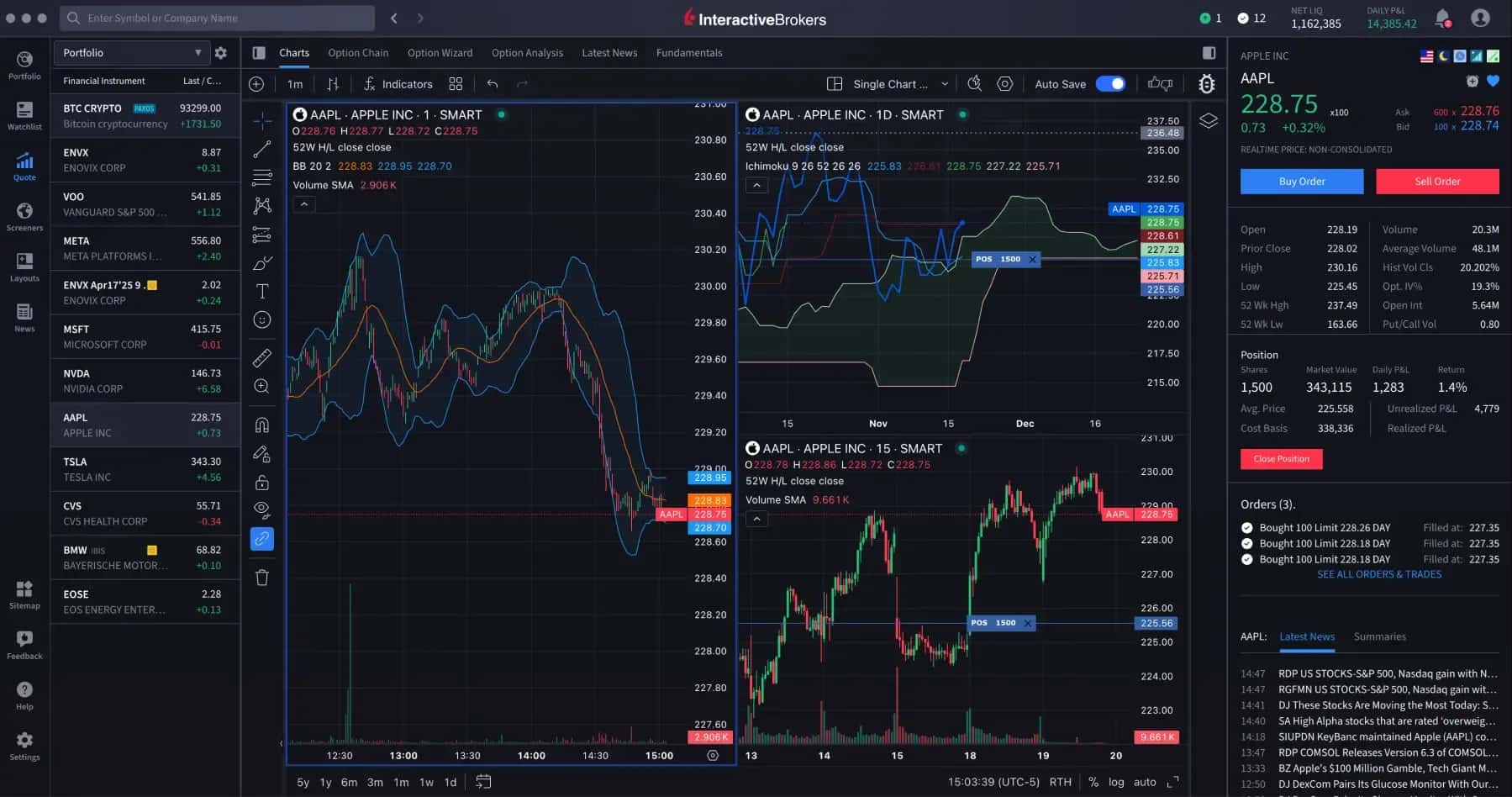
The platform is designed for investors and traders who need advanced trading capabilities without the complex configuration of the many windows and tools in TWS.
IBKR Desktop provides access to stocks, ETFs, options, futures, currencies, bonds, and investment funds.
Main IBKR Desktop features:
- Modern interface. Convenient navigation, ready-made workspaces, and the ability to customize trading panels.
- Advanced charts. Technical indicators, graphical analysis tools, and historical market data.
- Instrument scanners. Search for investment opportunities among stocks, ETFs, options, and bonds.
- Options trading. Options chains, a strategy builder, and analytical tools.
- Portfolio management. Tracking returns, balance, open positions, and margin requirements.
- Market data and news. Information about financial instruments, corporate events, and economic indicators.
- Customizable workspaces. Support for multiple monitors, separate tabs, and custom trading panels.
The platform also offers artificial intelligence-based analytical tools, including concise news summaries and assistance in finding investment ideas.
Unlike TWS, IBKR Desktop is designed for a simpler workflow. Many features are available through intuitive menus, and the interface requires less initial configuration.
IBKR Desktop is particularly suitable for active traders who need professional analytical capabilities but do not want to learn the complex architecture of Trader Workstation.
Client Portal
Client Portal is a browser-based Interactive Brokers trading platform that combines brokerage account management, trading, and investment portfolio analysis.
Client Portal does not require any additional software to be installed. Users simply need to log in to their personal account through a browser on a computer or mobile device.

The platform's main advantage is that it combines a simple interface with a broad set of features.
Main Client Portal features:
- Account management. View the balance, available funds, buying power, open positions, and transaction history.
- Trade execution. Search for financial instruments, place orders, and manage open orders.
- Portfolio analysis. Evaluate the current value of assets, profit and loss, investment allocation, and historical returns.
- Technical analysis. More than 100 technical indicators and 70 graphical tools.
- Fundamental analysis. Access to Fundamentals Explorer, corporate reports, and company financial data.
- Market news. Information about economic events, earnings releases, and changes in financial markets.
- Deposits and withdrawals. Management of bank details, transfers, and currency transactions.
- Reporting. Generate reports on trades, fees, returns, and tax information.
Of particular note is PortfolioAnalyst, a built-in portfolio analysis tool. It enables users to track investment returns, compare performance against market indices, and analyze asset allocation.
PortfolioAnalyst also supports the aggregation of information from multiple financial accounts, including accounts held with third-party brokers and banks, where the relevant integration is available.
Client Portal is suitable for investors who make a relatively small number of trades and prefer to manage their portfolio through a browser. For active intraday trading and complex strategies, TWS continues to offer broader capabilities.
IBKR Mobile
IBKR Mobile is the main Interactive Brokers mobile trading application available for iOS and Android devices. It is designed for investors and active traders who need to manage their account and execute trades from any location.
The application provides access to international markets for stocks, ETFs, options, futures, currencies, bonds, and investment funds.

In terms of functionality, IBKR Mobile comes close to the broker's desktop platforms, offering advanced trading tools in a mobile interface.
Key IBKR Mobile features:
- Trading on global markets. Access to more than 175 markets through a single brokerage account.
- Advanced order types. Support for market, limit, and stop orders, conditional orders, and selected execution algorithms.
- Options trading. Options Wizard and Option Spread Grid tools for creating and managing options strategies.
- Charts and technical analysis. Various time frames, technical indicators, and price analysis tools.
- Watchlists. Create custom asset lists and configure market alerts.
- Portfolio analysis. Track asset values, open positions, profit, and loss.
- Market news and research. Access to analytical materials and information about financial markets.
- Account management. View the balance, transaction history, reports, and available funds.
IB Key two-factor authentication is provided for security and uses login confirmation through a mobile device.

IBKR Mobile is particularly convenient for traders who need to monitor positions and respond quickly to market changes. However, desktop platforms remain more convenient for working with complex strategies and a large number of instruments.
IBKR GlobalTrader
IBKR GlobalTrader is a separate Interactive Brokers mobile application aimed primarily at beginner investors and users who prefer a simple interface.
Unlike IBKR Mobile, the application focuses primarily on making it easy to buy stocks, ETFs, and other investment instruments without having to learn complex professional features.
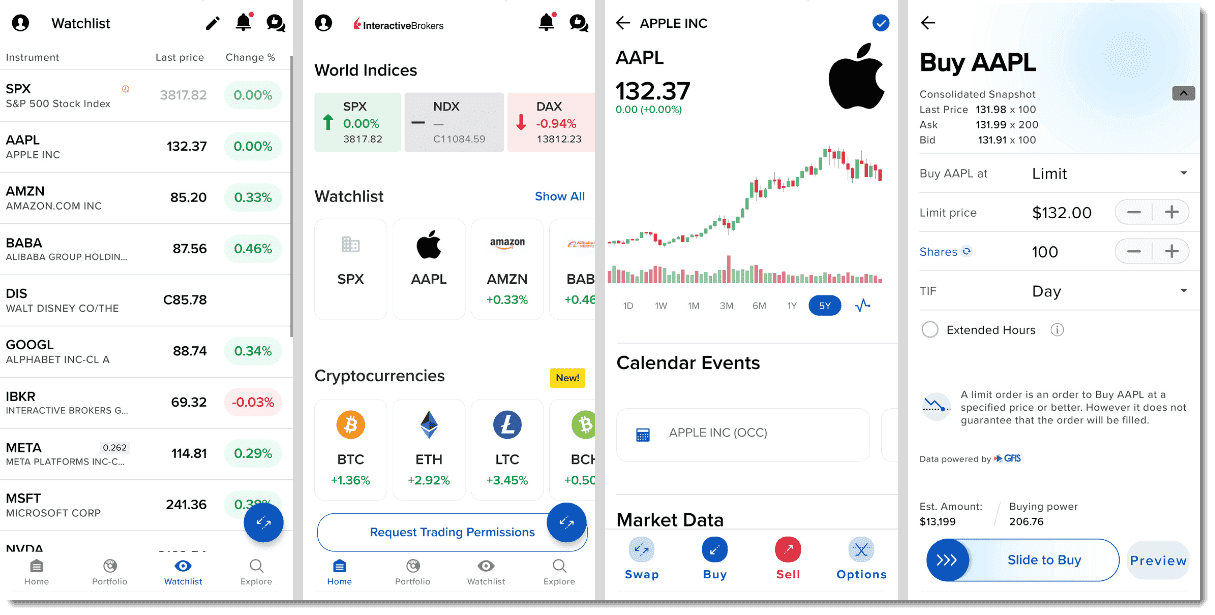
GlobalTrader provides access to more than 90 stock exchanges, including NYSE, NASDAQ, London Stock Exchange, and Hong Kong Stock Exchange.
Main application features:
- Buy and sell international stocks and ETFs.
- Trade fractional shares with small amounts.
- Simplified search for investment instruments.
- Automatic currency conversion for international investing.
- Trade US stocks and ETFs during extended hours, including selected instruments available nearly 24/5.
- Access to options, investment funds, and certain cryptocurrencies for eligible clients.
- Track portfolio and investment performance.
GlobalTrader allows users to open a brokerage account, fund it, and start investing directly from a smartphone.
The application is suitable for beginner investors and those who mainly buy stocks and ETFs to hold for the long term. However, IBKR Mobile or TWS is better suited to complex trading strategies, in-depth analysis, and professional order types.
IMPACT
IMPACT is a specialized Interactive Brokers mobile application for socially responsible investing that considers environmental, social, and governance factors (ESG).
The application helps investors select companies whose activities align with their personal values and investment preferences.
Main IMPACT features:
- Company assessment based on ESG criteria. Analysis of environmental responsibility, corporate governance, and social factors.
- Selection of investment values. The ability to define priorities such as environmental protection, gender equality, or business transparency.
- Exclusion of undesirable practices. Filter out companies associated with certain activities that the investor considers unacceptable.
- Portfolio analysis. Check whether current investments meet the selected ESG criteria.
- Trading transactions. Buy and sell shares of companies that match the user's preferences.
IMPACT uses ESG data from third-party analytics providers and Interactive Brokers' own algorithms. However, a company's compliance with specific ESG criteria does not guarantee its financial stability or investment returns.
The platform is suitable for investors who consider companies' social and environmental responsibility when building an investment portfolio.
TradingView
Interactive Brokers supports direct integration with TradingView, a popular platform for technical analysis of financial markets.
Users can connect their Interactive Brokers brokerage account to TradingView and execute trades directly through the platform's trading panel.
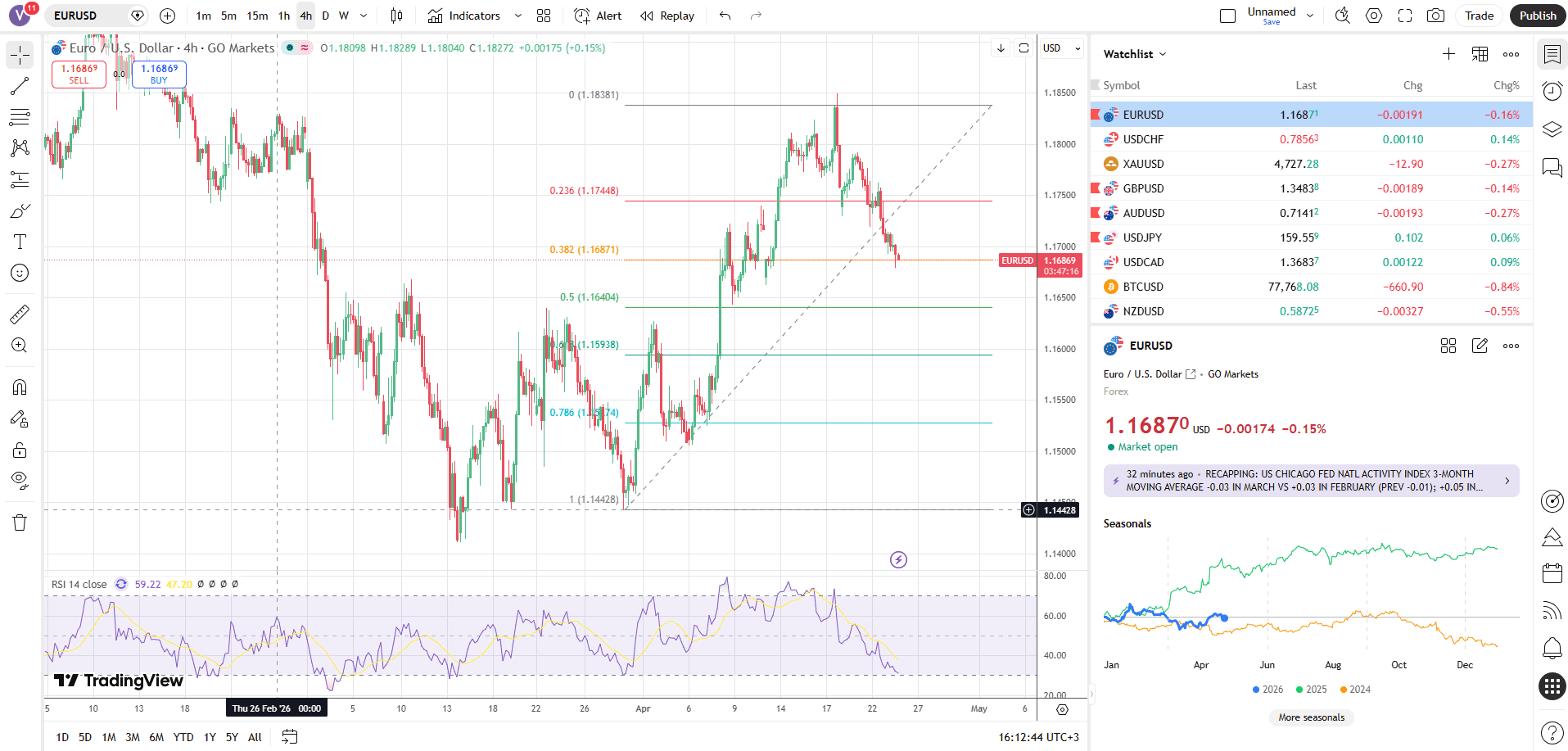
Main integration features:
- Advanced charts. A wide range of technical indicators, graphical tools, and time frames.
- Trading from charts. The ability to place and modify orders through the TradingView interface.
- Customizable alerts. Notifications about price changes and the fulfillment of market conditions.
- Custom indicators. Use of analytical tools and custom scripts written in Pine Script.
- Brokerage account synchronization. View available positions and manage supported orders.
The integration supports stocks, US stock and index options, futures, Forex, and selected cryptocurrency instruments. However, CFDs, bonds, and some other asset classes are not available through TradingView.
Active Interactive Brokers and TradingView accounts are required to connect. Some TradingView features and subscriptions may be available for an additional fee.
TradingView support makes Interactive Brokers particularly appealing to traders accustomed to using this platform for technical analysis.
APIs for Algorithmic Trading
Interactive Brokers offers an extensive API infrastructure for algorithmic traders, trading system developers, and institutional clients.
The APIs allow users to create custom trading applications, automate order placement, receive market data, and manage investment portfolios.
Main Interactive Brokers APIs:
API | Capabilities |
|---|---|
TWS API | Trading automation through Trader Workstation or IB Gateway |
Web API | Account management, trading, and data retrieval through REST and WebSocket |
FIX API | High-performance connectivity for professional and institutional trading systems |
TWS API supports application development in Python, Java, C++, C#, and other programming languages. It can be used to receive quotes, track positions, place orders, and implement custom trading algorithms.
Web API provides programmatic access to trading operations, account information, reporting, and other broker functions. WebSocket is supported for transmitting market data and notifications.
FIX API is aimed primarily at institutional clients that need specialized connections to execute large numbers of orders.
Interactive Brokers also supports integrations with third-party trading and analytics systems. However, their availability depends on the connection type, trading permissions, and technical requirements.
API solutions make Interactive Brokers attractive to algorithmic traders, quantitative analysts and developers of automated strategies.
Analytics
Interactive Brokers offers one of the most advanced sets of analytical tools among international brokers. Clients have access to fundamental and technical analysis, professional research, financial news, market scanners and investment portfolio assessment tools.
A particular strength of the broker is the integration of analytics directly into its trading platforms. Users can examine companies' financial metrics, compare investment instruments, assess risks and make trading decisions within a single ecosystem. A significant portion of the research is available free of charge, although some professional data and analytical materials require a paid subscription.
News and analytical research
Interactive Brokers provides access to financial news and research through the News & Research, integrated into Trader Workstation (TWS), IBKR Desktop, Client Portal and IBKR Mobile.
Clients receive free access to materials from more than 60 leading financial information providers, including Morningstar, Zacks, Dow Jones and other research firms. Additional research is available through paid subscriptions.
Key features of News & Research:
- Financial news. Coverage of stock markets, currencies, bonds, commodities and other financial instruments.
- Analytical reports. Research on individual companies, industries and economic trends.
- Analyst recommendations. Assessments by investment firms, target price changes and stock forecasts.
- Corporate events. Information on financial statements, dividends, mergers and acquisitions.
- Personalised news feed. Content related to assets in investment portfolios and watchlists.
The service supports more than 40 filters for finding publications by company, topic, content type and source.
In addition, Interactive Brokers publishes its own analytical content in the Traders' Insight section. It features stock market reviews, macroeconomic commentary, currency and commodity market research, and articles by guest experts.
Traders' Insight content is available free of charge and is updated regularly.
Fundamental analysis
For fundamental stock analysis, Interactive Brokers offers the Fundamentals Explorer.
It combines company financial statements, investment metrics, analyst forecasts and industry research. The service covers more than 30 000 companies worldwide and provides over 300 metrics for analysing each company.
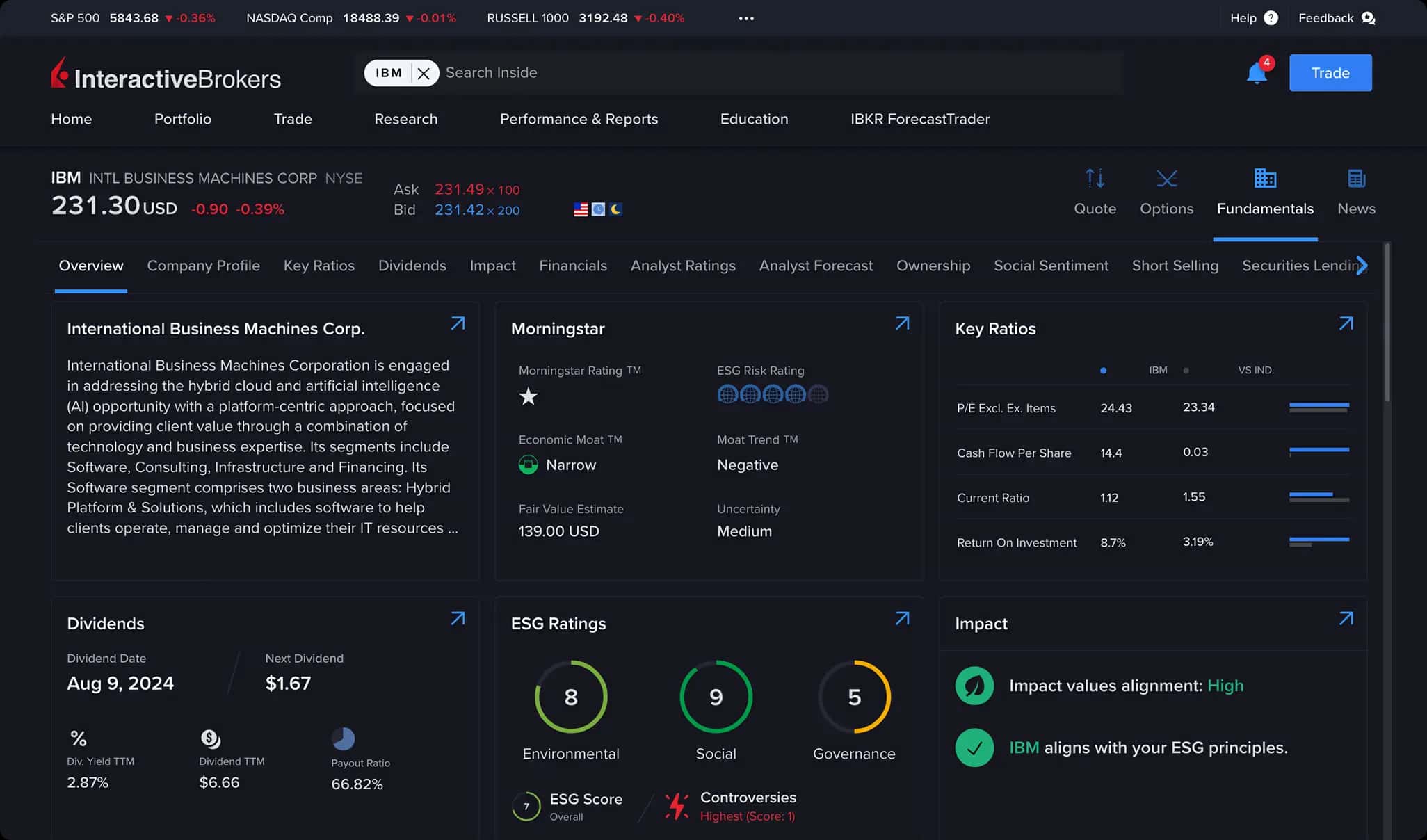
With Fundamentals Explorer, investors can examine:
- Financial statements — revenue, net income, cash flows and balance sheet metrics.
- Financial ratios — P/E, P/B, return on equity, debt levels and other metrics.
- Analyst forecasts — expected financial results, target prices and recommendations.
- Dividend policy — payment history, dividend yield and forecast dividends.
- Ownership structure — information on institutional and other major shareholders.
- Company comparisons — comparisons of financial metrics with competitors and industry averages.
- Historical data — changes in key financial metrics over previous periods.
Fundamentals Explorer also includes information on ESG ratings, economic events and financial news related to the selected company.
The Investment Themes tool also deserves particular attention, as it allows users to explore connections between companies, products, industries and geographic markets. It helps identify investment ideas based on economic and technological trends.
Fundamentals Explorer is available to Interactive Brokers clients free of charge through the broker's main trading platforms.
Technical analysis and market scanners
Interactive Brokers provides professional technical analysis tools integrated into TWS, IBKR Desktop and other trading platforms.
Users can analyse charts for financial instruments, apply technical indicators, examine historical quotes and track changes in market activity.
The following tools are available for identifying trading opportunities: Market Scanners — tools that automatically select assets according to specified criteria.
The scanners can identify:
- Stocks with the largest price gains or declines.
- Instruments with increased trading volume.
- Highly volatile stocks.
- Securities matching specified price and fundamental criteria.
- Options with high activity and unusual changes in volatility.
- Bonds with specified yields and credit ratings.
Traders can create their own filters, save settings and track market-scanning results.
An important advantage is the ability to use analysis results to proceed directly to trades. This is particularly convenient for day traders who need to identify new trading opportunities quickly.
Finding investment ideas — IBKR GlobalAnalyst
To find undervalued stocks in international markets, Interactive Brokers offers the free IBKR GlobalAnalyst.
The service allows users to compare companies from different countries by financial metrics, market capitalisation and share price, converting prices into a common currency.
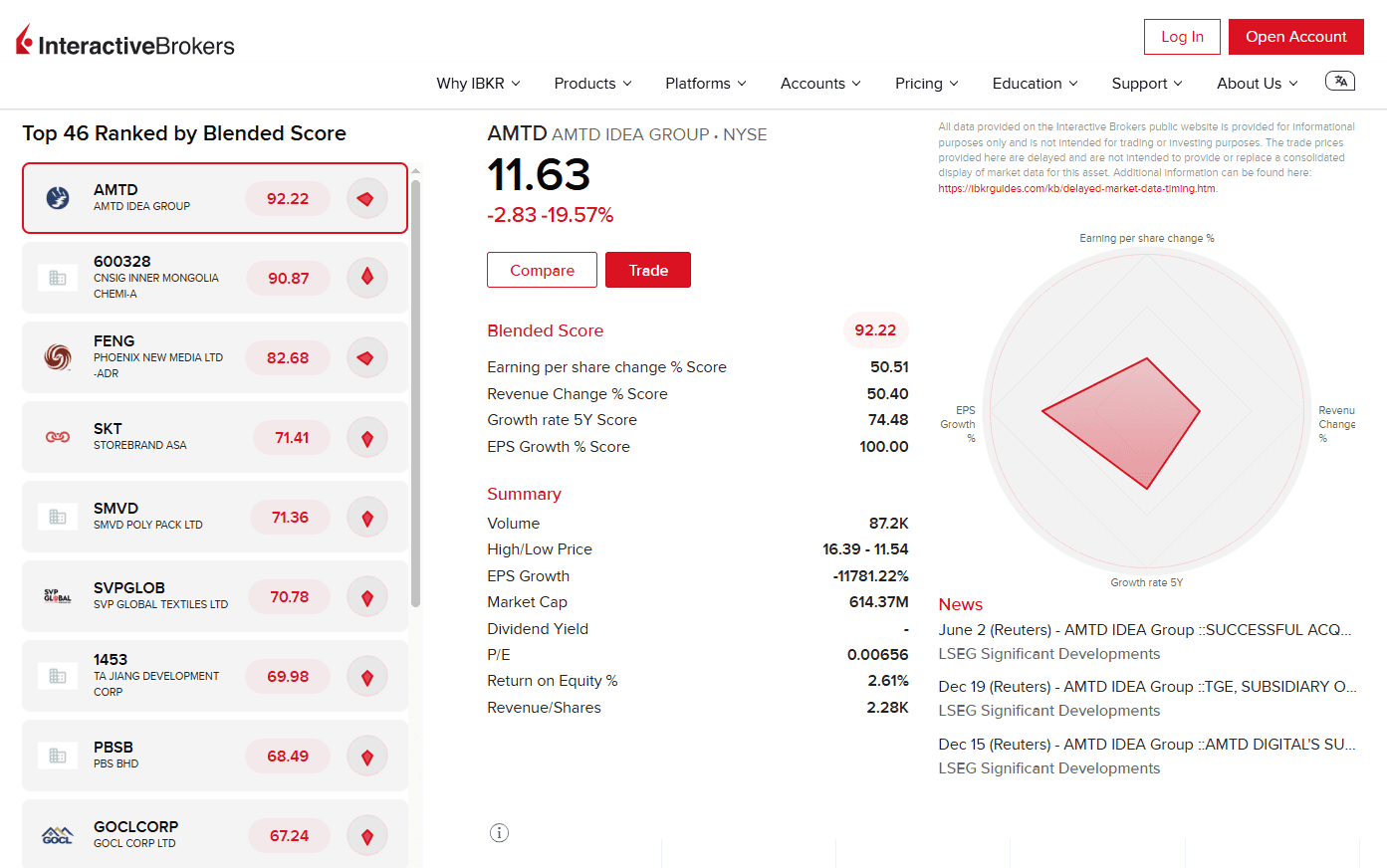
Users can filter companies by the following criteria:
- Country and geographic region.
- Industry.
- Market capitalisation.
- Trading currency.
- Financial ratios, including PEG.
For example, an investor can compare companies in the same industry from the US, Europe and Japan to determine which are trading at relatively low valuation multiples.
GlobalAnalyst is particularly useful for international portfolio diversification and finding investment opportunities beyond the investor's domestic stock market.
Options analytics and risk management
Interactive Brokers offers specialised analytical tools for trading options and other derivatives.
Among the most useful solutions are:
Tool | Purpose |
|---|---|
Option Strategy Lab | Selection of options strategies based on price and volatility forecasts |
Volatility Lab | Analysis of historical and implied volatility |
Probability Lab | Modelling the probability distribution of future prices |
Option Analytics | Analysis of option values and sensitivity to market parameters |
Risk Navigator | Investment portfolio risk assessment |
Options Lattice | Analysis of option volume, open interest and volatility |
Particularly useful is Risk Navigator, which allows users to model changes in portfolio value under various market scenarios. Traders can assess how changes in underlying asset prices, interest rates and volatility affect open positions.
Options traders can analyse Greeks—Delta, Gamma, Theta and Vega—which help assess the sensitivity of options positions to various factors.
These tools make Interactive Brokers attractive to professional traders who use complex strategies and actively manage market risks.
Investment portfolio analysis — PortfolioAnalyst
PortfolioAnalyst — one of the most functional analytical services offered by Interactive Brokers. It is designed to assess investment returns, asset allocation and an investor's overall financial position.
The service can analyse the performance of both individual brokerage accounts and combined investment portfolios.
Key features of PortfolioAnalyst:
- Return analysis. Calculation of investment results over different periods and comparison with market indices.
- Risk assessment. Use of Sharpe and Sortino ratios, alpha, beta and maximum drawdown.
- Asset allocation analysis. Breakdown of the portfolio by instrument class, economic sector and country.
- Expense monitoring. Analysis of trading commissions, interest, dividends and other cash flows.
- Benchmark comparisons. Assessment of an investment strategy's performance relative to selected market indices.
- Report generation. Creation of detailed reports on returns, portfolio structure and investment performance.
In addition, PortfolioAnalyst allows users to connect supported accounts from third-party brokers, banks and other financial institutions for a comprehensive analysis of their assets.
The service also provides financial planning tools, including retirement savings estimates, asset allocation planning and analysis of projected cash flows.
PortfolioAnalyst is provided free of charge and is available even to users without a brokerage account with Interactive Brokers.
Cost of analytical tools
Most of the built-in analytical tools offered by Interactive Brokers are available to clients free of charge. These include Fundamentals Explorer, IBKR GlobalAnalyst, PortfolioAnalyst and basic technical analysis features.
However, some services are available through paid subscriptions:
- Professional analytical research from third-party firms.
- Advanced market data packages.
- Real-time quotes and order book data for selected markets.
- Specialised analytical services for professional market participants.
The cost depends on the selected information provider, exchange and client status. Interactive Brokers allows users to activate and cancel subscriptions through Client Portal.
Education
Interactive Brokers offers an extensive educational programme designed for novice investors, active traders and professional financial market participants. The broker's main educational centre is IBKR Campus, which brings together interactive courses, video lessons, webinars, articles, podcasts and practical trading sessions.
The educational materials cover a wide range of topics, from investment basics and using trading platforms to complex options strategies, risk management and algorithmic trading. Most resources are provided free of charge, and many materials can be studied without opening a brokerage account.
Traders' Academy — trading academy
Traders' Academy — the main educational platform of Interactive Brokers, offering structured online courses on investing and trading in financial markets.
Courses are divided by difficulty level: Beginner, Intermediate and Advanced. Each course consists of individual lessons with video content, explanations and quizzes that help reinforce the knowledge acquired.
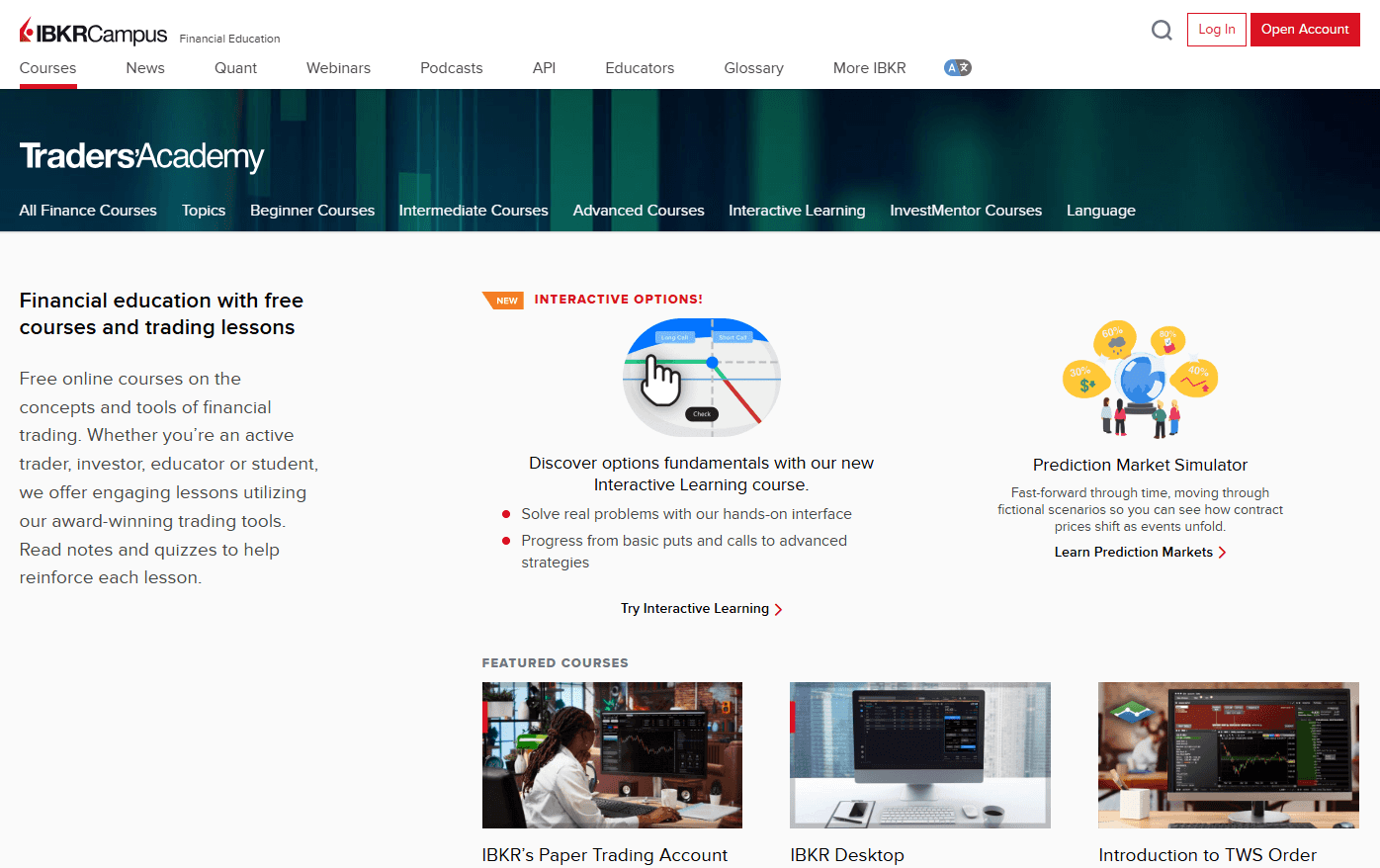
Main areas of study:
- Investment basics. How the stock market works, purchasing stocks, ETFs, bonds and building an investment portfolio.
- Technical and fundamental analysis. Studying charts, indicators, company financial statements and economic indicators.
- Forex and currency markets. The basics of currency trading, the features of currency pairs and the impact of macroeconomic factors.
- Options and futures. How derivatives work, risk calculation, hedging and the development of trading strategies.
- Risk management. Using protective orders, controlling leverage and managing capital.
- IBKR trading platforms. Learning to use TWS, IBKR Desktop, Client Portal and mobile apps.
- Algorithmic trading. Developing trading strategies using Python, API and other programming tools.
For example, a novice investor can work through the Getting Started at IBKR, Introduction to Stocks and Introduction to Exchange-Traded Funds (ETFs) courses in sequence. More experienced traders can access programmes on complex options strategies, volatility and professional portfolio management.
Learning is self-paced. Most courses can be viewed without registration, but a free IBKR Campus account allows users to save their progress, return to completed lessons and track quiz results.
All Traders' Academy courses are free. However, the broker does not award professional qualifications or official certificates upon completion.
Training on trading platforms
Interactive Brokers places particular emphasis on practical training with its own trading platforms. This is especially useful for novice clients because the broker's professional terminals contain numerous features and settings.
The IBKR Campus offers separate courses on Trader Workstation, IBKR Desktop, Client Portal, IBKR Mobile and GlobalTrader.
Course | What it teaches |
|---|---|
TWS for Beginners | Customising the interface and working with charts, orders and market data |
IBKR Desktop | Trading, market analysis and use of the modern desktop platform's tools |
Client Portal | Account management, trading, deposits and withdrawals |
IBKR Mobile | Mobile trading and investment portfolio management |
IBKR GlobalTrader | Purchasing stocks and ETFs through a streamlined mobile app |
Introduction to TWS Order Types | Using market, limit and stop orders, as well as more complex order types |
Lessons contain step-by-step instructions and interface demonstrations. Users can learn how to open a position, configure trading alerts, create watchlists and use analytical tools.
Separate courses cover advanced features of TWS, including OptionTrader, Risk Navigator, market scanners and algorithmic orders.
This training system allows users to progress gradually from simple operations to professional trading tools.
Webinars and educational videos
Interactive Brokers regularly hosts free webinars featuring its own specialists, professional traders and representatives of research firms.
Webinar topics include fundamental and technical analysis, options and futures trading, risk management, macroeconomics and modern investment strategies.
A notable feature of the live broadcasts is the opportunity to ask experts questions and receive explanations of the topics discussed.
A library of recordings from previous webinars is available for users who cannot attend the events live. The content can be viewed at a convenient time.
The current schedule and broadcast archive are available in the IBKR Webinars.
Webinars are particularly useful for investors who want to deepen their knowledge of specific financial instruments or learn about new trading approaches.
Articles, podcasts and financial literacy
In addition to structured courses, IBKR Campus offers educational articles, thematic reviews and podcasts.
The Traders' Insight section publishes content from financial market experts on economics, investing, trading strategies and various asset classes.
Although a significant portion of the publications is analytical, many articles explain practical aspects of trading, the characteristics of financial instruments and risk management methods.
A separate offering is IBKR Podcasts. In the audio episodes, specialists discuss how financial markets work, investment strategies, macroeconomic events and traders' professional experience.
Podcasts are available directly on IBKR Campus and popular audio platforms, including Spotify and Apple Podcasts.
For novice investors, Traders' Glossary provides a financial dictionary containing definitions of terms used in stock, currency and derivatives markets.
IBKR Quant — algorithmic trading education
For experienced traders, programmers and quantitative analysts, Interactive Brokers offers specialised materials in IBKR Quant.
This educational section focuses on applying programming, mathematical models and data analysis to trading.
Publications and educational materials cover the development of automated strategies, historical data analysis, backtesting and working with trading APIs.
Traders' Academy offers separate courses on TWS API and Web API, including Python programming examples.
Users can learn to retrieve market quotes, analyse data, place orders automatically and manage trading positions.
The materials also cover Python libraries, quantitative analysis methods, machine learning and the use of artificial intelligence in financial research.
IBKR Quant is particularly useful for algorithmic traders and developers of proprietary trading systems. However, a basic knowledge of programming and statistics is required to fully understand these materials.
Practical training with a demo account
Interactive Brokers provides an opportunity to reinforce the knowledge gained on a practice account Paper Trading, which allows users to make virtual trades without using real capital.
Clients with access to Paper Trading are usually provided with a virtual balance of $1 000 000, which can be used to test trading strategies.
The practice account allows users to learn how to work with various financial instruments, practise placing orders, analyse results and explore the features of TWS and other trading platforms.
Users who have not yet opened a live account can access the Free Trial, which demonstrates the broker's trading infrastructure.
It should be noted that virtual order execution differs from live trading, while market data may be delayed or depend on active subscriptions.
Additionally, Interactive Brokers develops Student Trading Lab — an educational program for universities and finance instructors. It enables IBKR trading platforms, analytical tools and educational scenarios to be used in teaching.
Customer Support
Interactive Brokers provides clients with international technical support through regional service centres in the Americas, Europe and Asia. Help is available by phone, online chat and the ticketing system in the client portal. The broker also offers an extensive knowledge base and the IBot virtual assistant for finding answers independently.
The support team helps resolve questions about account opening and verification, deposits and withdrawals, the use of trading platforms, order execution and margin requirements. However, despite the extensive service infrastructure, client reviews indicate inconsistent support quality and possible delays in resolving complex issues.
How can you contact support?
Interactive Brokers offers several ways to contact support.
1. Online chat (Live Chat)
Clients of Interactive Brokers can contact a broker representative through the secure chat in Client Portal. To do so, they must log in, open the Support section and select Live Chat.
The chat is suitable for questions about trading platforms, banking transactions, account settings and trading permissions. Because login is required, staff can securely provide information related to a specific account.
2. Phone support
Phone support is recommended for urgent issues related to order execution, position liquidation, restoring account access and security.
Main contact numbers for Interactive Brokers:
Region | Phone |
|---|---|
United States | +1 312 542 6901 |
United Kingdom | +44 20 3744 7220 |
Ireland | +353 1 264 0643 |
Europe | +41 41 562 09 02 |
Australia | +61 2 7251 0088 |
Singapore | +65 6990 5200 |
The full list of regional contacts is published on the official support page for Interactive Brokers.
3. Message Center
For non-urgent questions, Interactive Brokers recommends using the ticketing system available through Client Portal.
To submit an inquiry, open Help → Message Center → Compose → New Ticket, select the relevant category and describe the problem.
Each inquiry is assigned a number that can be used to track the correspondence history and staff responses. The broker recommends this channel for questions about commissions, tax documents, corporate actions and banking transactions.
4. Email
Interactive Brokers does not support regular communication with clients through a public email address for security reasons. Message Center must be used instead.
Prospective clients who have not yet opened an account can submit an inquiry using a dedicated form on the broker's website. The response will be sent to the email address provided.
5. IBot virtual assistant
Interactive Brokers offers the automated IBot assistant, which helps users find answers to common questions.
It can provide instructions on funding an account, withdrawing funds, configuring trading platforms, commissions and using different order types.
IBot is available for finding information independently, but complex issues and problems requiring verification of client data must be handled by support staff.
Support hours
Interactive Brokers provides phone support almost around the clock during the five-day trading week, thanks to its network of international service centres.
The official phone support schedule is from Sunday at 13:00 until Friday at 19:30 U.S. Eastern Time (ET). Phone support is unavailable on Saturday and operates on reduced hours on Sunday.
Online chat is available from Sunday evening through Friday, although the service start time may vary slightly by department. The availability of individual languages also depends on the working hours of the relevant specialists.
For written inquiries, Interactive Brokers gives an estimated response time of up to 24 hours if the inquiry is received during regular business hours. The actual time required to resolve the problem depends on its complexity and whether additional checks are needed.
For urgent trading issues, the broker recommends contacting support by phone, while online chat or the ticketing system is recommended for inquiries about fund transfers, commissions and documents.
Technical support reviews
Customer reviews of technical support from Interactive Brokers are mixed. Despite the wide range of contact methods and international service infrastructure, users often complain about long response times and difficulties resolving unusual issues.
On Trustpilot Interactive Brokers has an overall rating of around 3 out of 5 based on more than 5 500 reviews. This rating covers the broker's operations as a whole, but a significant proportion of negative comments specifically concern customer service.
The most common complaints include long waits to connect with an agent, requests to resubmit documents, delayed responses to inquiries and difficulties restoring account access.
For example, users reported waiting more than 30–45 minutes for a response by phone, repeated requests for information already provided and lengthy reviews of technical problems.
At the same time, there are also positive reviews. Some clients note the professionalism of staff, helpful advice and quick resolution of issues after connecting with a specialist. Support with trading platforms and account configuration is particularly sought after.
It should be kept in mind that online reviews are subjective and may disproportionately reflect negative experiences, so they cannot be considered an accurate indicator of average response times or the proportion of successfully resolved inquiries.
Interactive Brokers Alternatives
Looking for Interactive Brokers alternatives? Compare key features of Interactive Brokers against its competitors.
| Broker |  Trading 212 |  eToro | Interactive BrokersCurrent broker |  IG |  OANDA |
|---|---|---|---|---|---|
| Rating | 4.3/5 | 3.8/5 | 4.7/5 | 4.1/5 | 4.3/5 |
| Minimum deposit |
|
|
|
|
|
| Spread | from 0 points | from 1 points | from 0.1 points | from 0.165 points | from 0.5 points |
| Trading platforms |
|
|
|
|
|
| Reviews | Trading 212 review | eToro review | — | IG review | OANDA review |
| Broker comparison | Interactive Brokers vs Trading 212 | Interactive Brokers vs eToro | — | Interactive Brokers vs IG | Interactive Brokers vs OANDA |
If you want to compare Interactive Brokers with other forex brokers in more detail, go to the Forex Brokers Comparison page.
Conclusion
Interactive Brokers is one of the largest international brokers, offering extensive opportunities for trading and investing in global financial markets. The company combines high reliability, competitive trading conditions and advanced technological infrastructure. Thanks to its many years of experience, international regulation and continuous service development, Interactive Brokers holds a leading position among brokers for self-directed investing.
Interactive Brokers is primarily suited to experienced traders, active investors and professional market participants who value a wide range of instruments, low fees and advanced trading capabilities. The broker is also an excellent choice for long-term investors building diversified portfolios. For beginners, Interactive Brokers is suitable if they are willing to learn a fairly complex trading infrastructure.
FAQ
Is Interactive Brokers legit?
Yes, Interactive Brokers is a legitimate and well-established international broker with a history dating back to 1977. Its subsidiaries are regulated by major financial authorities, including the SEC, CFTC, and FINRA in the United States, the FCA in the United Kingdom, and ASIC in Australia. The broker provides segregated client asset protection and participates in investor compensation schemes where applicable. However, regulatory protection varies by jurisdiction, and investing always involves financial risks.
Which country is Interactive Brokers from?
Interactive Brokers is an American brokerage company headquartered in Greenwich, Connecticut, United States. Its history began in 1977 when Thomas Peterffy established an electronic trading business. The Interactive Brokers brokerage operation was formally established in 1993. Today, the company operates internationally through regulated subsidiaries in North America, Europe, Asia, and Australia.
Is Interactive Brokers an ECN broker?
Interactive Brokers provides direct market access and ECN-style execution, although it does not operate as a conventional retail Forex ECN broker. Its Forex platform aggregates quotes from 17 major international liquidity providers, offering tight floating spreads and transparent trading commissions. IBKR also connects clients to stock exchanges and electronic trading networks. Execution arrangements vary by financial instrument and market.
How does Interactive Brokers make money?
Interactive Brokers generates revenue primarily through trading commissions, interest earned on margin loans, and net interest income from client cash balances. Additional revenue comes from market data subscriptions, securities lending, and other brokerage services. The IBKR Pro plan uses fixed or tiered commissions, while IBKR Lite offers commission-free trading on eligible US stocks and ETFs.
Is Interactive Brokers good for beginners?
Interactive Brokers can be a good choice for beginners interested in long-term investing and learning about global financial markets. The broker offers accounts with no minimum deposit, simplified platforms such as IBKR GlobalTrader and Client Portal, and extensive free educational resources through IBKR Campus. However, its professional trading tools and complex account settings may be challenging for inexperienced traders.
Does Interactive Brokers offer a demo account?
Yes, Interactive Brokers offers free demo trading through its Free Trial and Paper Trading services. Paper Trading accounts typically include $1,000,000 in virtual funds, allowing users to practice trading stocks, options, futures, Forex, and other instruments without risking real money. The demo environment supports strategy testing and familiarization with trading platforms, although simulated execution may differ from live market conditions.
How can I open an account with Interactive Brokers?
To open an Interactive Brokers account, visit the official website and select Open Account. Create a username and password, choose an account type, and complete the application with your personal information, tax residency, financial details, and investment experience. Upload the required identity and address verification documents. Once your application is approved, you can fund your account and start trading.
How can I delete my Interactive Brokers account?
To close your Interactive Brokers account, first close or transfer any open positions and arrange to withdraw your remaining funds. Then log in to Client Portal and navigate to Settings → Account Configuration → Close Account. Follow the instructions, select a reason for closure, and submit your request. Closing an account does not automatically erase personal information that Interactive Brokers is legally required to retain.
What is the minimum deposit for Interactive Brokers?
The minimum deposit at Interactive Brokers is $0 for standard Individual, Joint, and Trust accounts. However, margin trading generally requires at least $2,000 in account equity under US rules. Portfolio Margin accounts have significantly higher requirements, starting at $110,000 for eligible US accounts. Additional requirements may apply depending on the financial instruments and account jurisdiction.
What is the maximum leverage on Interactive Brokers?
Interactive Brokers does not offer a single maximum leverage ratio across all markets. Leverage depends on the instrument, account type, regulatory jurisdiction, and margin requirements. For example, standard US Reg T stock margin accounts generally allow 1:2 overnight leverage, with higher intraday buying power for eligible traders. Forex, futures, and CFD leverage follows different rules, and available limits may change with market conditions.
How do I deposit funds in an Interactive Brokers account?
Log in to Client Portal and navigate to Transfer & Pay → Transfer Funds → Deposit Funds. Select your currency and preferred funding method, then follow the instructions. Available methods include bank wire transfers, ACH, SEPA, Wise, and regional payment systems. Eligible Interactive Brokers LLC clients can also deposit supported stablecoins. Standard deposits are generally free from IBKR fees, although banks and payment providers may charge additional fees.
How do I withdraw money from Interactive Brokers?
To withdraw funds, log in to Client Portal and select Transfer & Pay → Transfer Funds → Withdraw Funds. Choose a currency, select an available withdrawal method, enter the destination account details, and confirm the request. Interactive Brokers allows two free withdrawal requests per calendar month. Subsequent withdrawals may incur fees. Bank transfers typically take one to three business days, depending on the payment method and destination.
Does Interactive Brokers provide VPS?
Interactive Brokers does not offer a standard free VPS hosting service for retail trading accounts. However, traders can use third-party Virtual Private Server providers to run automated strategies through Trader Workstation (TWS) or IB Gateway. This setup can support remote operation of trading algorithms, although users are responsible for server maintenance, security, connectivity, and compliance with IBKR's API requirements.
Is Interactive Brokers suitable for scalping?
Yes, Interactive Brokers is suitable for scalping and other short-term trading strategies. The broker offers competitive commissions, direct market access, advanced order types, and professional trading platforms such as Trader Workstation. Its SmartRouting technology can help optimize order execution. However, scalpers must consider minimum commissions, market data costs, liquidity, and applicable day-trading or margin restrictions.
Is Interactive Brokers suitable for auto-trading?
Yes, Interactive Brokers is well suited for automated and algorithmic trading. It provides TWS API, Web API, and FIX API solutions that allow traders to develop custom trading systems, automate order execution, and access market data. Supported programming languages include Python, Java, C++, and C#. Traders can also connect compatible third-party platforms and test automated strategies using Paper Trading before deploying them on live accounts.
Is Interactive Brokers suitable for hedging?
Yes, Interactive Brokers supports a wide range of hedging strategies using options, futures, currencies, and short selling. Traders can use derivatives to protect existing positions, manage currency exposure, or reduce portfolio risk. The broker also provides professional risk-management tools, including Risk Navigator. However, hedging opportunities depend on trading permissions, margin requirements, and local regulations, and hedging does not eliminate investment risk.