Markets.com Review 2026
Markets.com is suitable for beginners and experienced traders who value user-friendly trading platforms, high-quality analytics, and day trading.
- Markets.com is trusted. Tested via live trading.
Highlights of Markets.com

Markets.com is an international Forex and CFD broker regulated by CySEC (Cyprus) and FSCA (South Africa). The broker offers a wide range of trading instruments, including currency pairs, stocks, indices, commodities, cryptocurrencies, ETFs and bonds. Its proprietary trading platform, support for MetaTrader 4 and MetaTrader 5, as well as a variety of analytical tools, make Markets.com attractive to both beginners and experienced traders.
Pros and cons of Markets.com
Pros
- Regulation by CySEC and FSCA, and a long operating history dating back to 2008.
- Variety of trading accounts, including Raw and Micro.
- User-friendly Markets Terminal platform with TradingView charts, plus support for MT4 and MT5.
- Wide range of analytical tools and educational materials.
- Variety of deposit and withdrawal methods with no fees charged by the broker.
Cons
- High swaps and a Raw trading commission above the market average.
- Account inactivity and currency conversion fees.
- Inconsistent customer support quality.
Markets.com reviews

Markets.com
What traders talk about
No reviews yet.
Leave a review of your experience:
Markets.com Broker Overview
| Parameter | Markets.com |
|---|---|
| Foundation Year | 2008 |
| Official Website | https://www.markets.com |
| Regulated in Countries | Cyprus, South Africa, Saint Vincent and the Grenadines More Details |
| Minimum Deposit |
|
| Spread | from 0.1 points |
| Max Leverage | 1:1000 |
| Trading Assets |
|
| Trading Platforms |
|
| Email Support | |
| Hotline Phones | |
| Social Media |



Markets.com is an international Forex and CFD broker founded in 2008. In that same year, the company obtained a licence from the Cyprus Securities and Exchange Commission (CySEC) through the legal entity Safecap Investments Limited. The broker subsequently expanded its presence in the international market, beginning to provide services in Europe, Asia, Africa, Latin America and the Middle East. Today, Markets.com has more than 5.1 million registered users from more than 170 countries.
Markets.com's main business activity is providing retail traders with access to global financial markets through trading contracts for difference (CFDs). The company offers trading in currency pairs, stocks, stock indices, commodities and cryptocurrencies, while also developing trading technology, analytical tools and educational resources for traders with varying levels of experience.
Markets.com Review Summary
Reliability and Regulation
Markets.com is a fairly reliable broker with a long operating history, licences from CySEC and FSCA, and mechanisms for protecting client funds.
Advantages
- Regulation by CySEC and FSCA.
- Long operating history since 2008.
- Segregation of client funds and negative balance protection.
Disadvantages
- Past regulatory fines.
We evaluated Markets.com against a range of key criteria, including reliability and regulation, trading conditions, commissions, the variety of trading instruments, platform functionality, and the quality of analytics, education and customer support. All ratings are based on our broker rating methodology, which provides an objective and comprehensive approach to analysis.
Read our review of Markets.com below to learn more about the broker's features, advantages and disadvantages and determine how well it meets your trading needs.
Reliability and Regulation
| Legal Entity | Regulator |
|---|---|



Markets.com has a fairly solid regulatory framework and has operated in the financial markets since 2008. The European division, Safecap Investments Limited, is regulated by the Cyprus Securities and Exchange Commission (CySEC), while Markets South Africa (Pty) Ltd is supervised by the South African regulator FSCA. To serve international clients, the broker also uses Markets International Limited, a company registered in Saint Vincent and the Grenadines.
The broker states that it holds client funds in segregated bank accounts and provides negative balance protection. Clients of the European division are also eligible for compensation of up to €20 000 from the Investor Compensation Fund (ICF), subject to the fund's terms.
At the same time, the regulatory history of Markets.com is not spotless: in 2015, CySEC fined Safecap Investments Limited in the amount of €168 000 for violations of investment services legislation. In addition, divisions in the United Kingdom, Australia and the British Virgin Islands that previously served Markets.com clients have stopped providing services under this brand.
Overall, Markets.com can be considered a fairly reliable broker with a long operating history and licences from recognised financial regulators.
Account Opening
Opening an account with Markets.com takes place entirely online and does not require a visit to the broker's office. The registration process is fairly convenient and includes step-by-step instructions. To begin trading on a live account, users must complete a questionnaire and undergo mandatory identity verification.
Registration
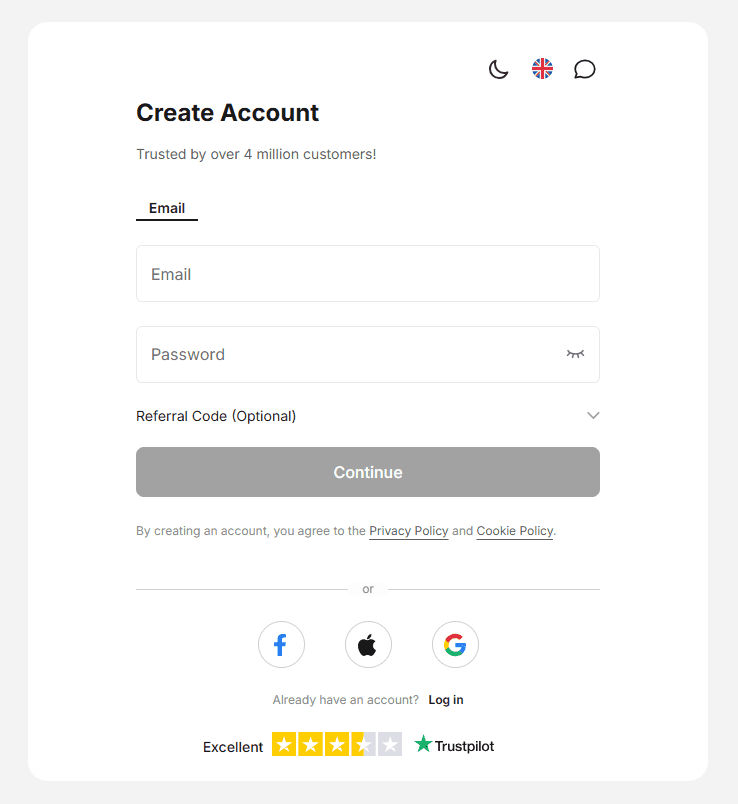
To register with Markets.com, complete the following steps:
- Go to the broker's official website and click the registration button.
- Enter an email address and create a password. Simplified registration through Google, Apple or Facebook accounts is also available.
- Select your country of residence and provide information about your citizenship and tax residency.
- Enter your mobile phone number.
- Complete a questionnaire about your employment, financial situation and trading experience.
- Enter your taxpayer identification number (TIN) or state why you do not have one.
- Review the user agreement, risk disclosure and the broker's other legal documents.
- Proceed with identity verification.
After completing registration, the client gains access to the Markets.com trading platform. However, identity verification is required to place trades on a live account.
Verification
Markets.com uses Sumsub for automated client identity checks. The verification procedure requires an identity document and biometric facial verification.
The following documents are accepted as proof of identity:
- ID card;
- passport for international travel;
- driver's licence;
- residence permit.
The client must select the document's country of issue, upload a photo of it and complete a facial check using a camera. If necessary, the procedure can be continued on a mobile device.
The broker may also request proof of residential address. A bank statement, utility bill or another official document issued within the past six months can be used for this purpose.
Document verification usually takes one business day. The account can be funded before verification is complete, but deposited funds will be reserved and unavailable for trading until identity is confirmed.
Account base currency
Markets.com offers a fairly wide selection of base currencies for trading accounts.
Nine currencies are available on the proprietary Markets Terminal trading platform:
- USD — US dollar;
- EUR — euro;
- GBP — British pound;
- AUD — Australian dollar;
- DKK — Danish krone;
- NOK — Norwegian krone;
- PLN — Polish zloty;
- SEK — Swedish krona;
- ZAR — South African rand.
The availability of specific currencies may depend on the client's country of residence and trading account type. The wide selection of base currencies allows traders to reduce conversion costs when depositing and withdrawing funds.
Minimum deposit
The minimum deposit with Markets.com is 100 USD, EUR or GBP. However, the initial deposit amount may vary depending on the client's country of residence and payment method.
This entry threshold can be considered moderate, although many competing Forex brokers allow clients to begin trading with a smaller amount or have no minimum deposit requirement at all.
Account Types
Markets.com offers several types of trading accounts designed for traders with different levels of experience, capital and trading strategies. Clients can choose from standard accounts with no trading commission, accounts with tight spreads and a separate commission, micro accounts, as well as demo and Islamic accounts. The broker also offers the Markets Club loyalty program and various bonus programs.
Trading accounts
Markets.com divides its trading accounts into two categories: Markets Terminal and Markets Terminal Pro. The first is intended for trading on the broker's proprietary platform, while the second is designed for use with MetaTrader 4 and MetaTrader 5.
| Parameter | Markets Terminal | Standard | Raw | Micro |
|---|---|---|---|---|
| Account Currency | USD, EUR, GBP, AUD, ZAR, DKK, SEK, NOK, PLN | USD, EUR, GBP, ZAR | USD, EUR, GBP, ZAR | USD, EUR, GBP, ZAR |
| Minimum Deposit | $100, €100, £100 | $100, €100, £100 | $100, €100, £100 | $100, €100, £100 |
| Spread | from 0.7 pips~ 1.3 pips | from 0.7 pips~ 1.3 pips | from 0.1 pips~ 0.1 pips | from 0.7 pips~ 1.3 pips |
| Commission per Trade | No commission | No commission | $3.50 | No commission |
| Leverage | 1:1-1:1,000 | 1:1-1:500 | 1:1-1:500 | 1:1-1:500 |
| Order Execution | MM | MM | MM | MM |
| Trading Platforms | Markets Terminal | MetaTrader 4, MetaTrader 5 | MetaTrader 4, MetaTrader 5 | MetaTrader 4, MetaTrader 5 |
| Trading Assets | Forex, Precious Metals, Energy Carriers, Soft Commodities, Indices, Stocks, ETF, Bonds, Cryptocurrency | Forex, Precious Metals, Energy Carriers, Soft Commodities, Indices, Stocks, Bonds, Cryptocurrency | Forex, Precious Metals, Energy Carriers, Soft Commodities, Indices, Stocks, Bonds, Cryptocurrency | Forex, Precious Metals, Energy Carriers, Soft Commodities, Indices, Stocks, Bonds, Cryptocurrency |
| Margin Call / Stop Out | 100%50% | 100%50% | 100%50% | 100%50% |
| Opened Positions | — | up to 50 | up to 50 | up to 50 |
| Demo Account | Yes | Yes | Yes | Yes |
| Islamic Account | Yes | Yes | Yes | Yes |
Let us examine the features of each trading account:
- Markets Terminal — a versatile account with no separate trading commission, providing access to the broadest range of financial instruments and the built-in analytical services on the broker's proprietary platform.
- Standard — a classic trading account with floating spreads and no additional commission. It is suitable for beginners and traders who prefer traditional trading strategies.
- Raw — an account with tight spreads from 0.1 pips and a separate commission on trades. It is designed for active traders, scalpers and users of trading robots.
- Micro — an account with a reduced contract size. One Forex lot is equivalent to 1 000 units of the base currency, allowing traders to trade smaller volumes and manage risk more flexibly.
Hedging is permitted on all three types of MetaTrader accounts.
Demo account
Markets.com provides a free demo account that allows users to explore the trading platforms' features, learn the basics of trading and test different strategies without risking real funds.
A demo account can be created separately or obtained when registering a live trading account. Users can switch between accounts directly in the trading platform.
Islamic account
Markets.com offers Islamic accounts (Swap Free) for traders whose religious beliefs prevent them from receiving or paying interest for holding trading positions overnight.
To activate an Islamic account, users must register with the broker, contact customer support and complete a special application form. After reviewing the application, the broker may convert the trading account to Swap Free status.
The following conditions apply to Islamic accounts:
- no standard swaps on most trading instruments;
- the maximum holding period for an open position is 21 calendar days;
- swaps charged on cryptocurrency CFDs even during the interest-free period;
- the possibility of swaps being charged retroactively, additional commissions being introduced or Swap Free status being revoked if the terms of the agreement are violated.
Consequently, the Islamic account offered by Markets.com has significant restrictions, especially for traders who prefer long-term strategies and cryptocurrency trading.
Markets Club
Markets Club is a multi-level loyalty program from Markets.com that provides clients with partial spread rebates, additional bonuses, personalised service and analytical materials.
The program has four membership levels. A client's status is determined by their total deposits or trading volume during the calculation period.
Conditions and privileges | Silver | Gold | Platinum | Diamond |
|---|---|---|---|---|
Deposit amount | $2 500 | $8 000 | $40 000 | $160 000 |
Or minimum trading volume | $5 million | $40 million | $150 million | $800 million |
Spread rebate | 10% | 15% | 20% | 25% |
Stop Out level | 50% | 40% | 30% | 30% |
Birthday gift | $50 | $100 | $150 | $300 |
Deposit bonus | Up to 15% | Up to 15% | Up to 15% | Up to 15% |
Personal account manager | Yes | Yes | Yes | Yes |
Personalized trading analytics | Yes | Yes | Yes | Yes |
Weekly market reviews | Yes | Yes | Yes | Yes |
Daily analytics | Yes | Yes | Yes | Yes |
Webinars | Yes | Yes | Yes | Yes |
Each calendar month is divided into two calculation periods: from the 1st to the 15th and from the 16th to the last day of the month. At the end of each period, the broker reviews the participant's program status.
Key features of Markets Club:
- when calculating trading volume, only closed trades in commodities and cryptocurrencies that remained open for more than five minutes are counted;
- the trading volume requirements must be met to receive the spread rebate;
- the maximum spread rebate is $10 000 per month;
- 20% of the deposit amount and 10% of the trading volume may be carried over to the next calculation period if the program conditions are met;
- to receive the birthday gift, trades totaling at least 15 lots must be completed within the 90 days preceding the birthday month.
Markets Club is most appealing to active traders with substantial capital. However, the high trading volume requirements and the limited range of eligible instruments make the program less accessible to most retail clients.
Promotions from Markets.com
Markets.com offers various promotions for new and existing clients of its international division, including deposit bonuses, rebates on some trading costs, and rewards for referring new users.
Promotion | Conditions |
|---|---|
Verification bonus | $20 voucher subject to trading volume requirements |
First deposit bonus | Up to 25%, maximum $2 000 |
Welcome trading cashback | Up to $2 980 |
Repeat deposit bonus | 10%, maximum $10 000 |
Anniversary deposit bonus | 18%, maximum $10 000 |
Refer a friend | Total reward of up to $550 per referred client |
Markets Club | Rebate of up to 25% of the spread and additional privileges |
To manage bonuses and rewards, the broker provides a dedicated Reward Hub section in the client portal. Clients can use it to track available promotions, activate bonus coupons, and check whether they have met the conditions of various offers.
Rewards are divided into four categories:
- Deposit Coupon — coupons for receiving additional bonus funds when funding an account.
- Trading Coupon — coupons for receiving cash rebates on trading transactions.
- Bonus — bonus funds that may be used for trading and covering trading costs. Whether they can be withdrawn depends on the conditions of the specific promotion.
- Cash — cash rewards available for withdrawal after the program conditions have been met and the funds have been credited.
Note that the availability of bonus programs depends on the country of residence, the client's registration method, and other criteria. In addition, most deposit bonuses have a limited validity period and cannot be withdrawn directly. Before participating in any promotion, it is advisable to review its legal terms. Bonus funds do not eliminate the risks of CFD trading.
Commissions
Considering its overall trading and non-trading costs, Markets.com appears somewhat more expensive than the market average. Spreads on the Markets Terminal account are around the average level, while the trading commission on the Raw account is slightly above the market average. High swaps are a significant drawback, reducing the broker's appeal for medium- and long-term trading. In addition, Markets.com charges an account inactivity fee, although the broker does not charge a withdrawal fee.
Spreads and swaps
Based on our testing, spreads on the Markets Terminal account for major currency pairs are in line with market averages. The broker offers reasonable conditions for intraday trading but has no notable advantage over competitors in terms of spread size.
| Asset | Average spread | Swap long | Swap short |
|---|---|---|---|
| EURUSD | 1.3 pips | -15.84 pips | -8.25 pips |
| GBPUSD | 1.0 pips | -15.34 pips | -13.50 pips |
| AUDUSD | 1.2 pips | -9.43 pips | -5.18 pips |
| NZDUSD | 1.9 pips | -5.88 pips | -6.37 pips |
| USDCHF | 1.9 pips | -1.09 pips | -22.14 pips |
| USDCAD | 1.7 pips | -13.76 pips | -17.77 pips |
| USDJPY | 1.4 pips | 5.25 pips | -40.25 pips |
Markets.com swaps appear high compared with those of other Forex brokers. For most major currency pairs, holding positions overnight results in charges on both buy and sell trades. This makes the broker's trading conditions less attractive to medium- and long-term traders, as well as to proponents of the carry trade strategy.
Trading commission
Markets Terminal, Standard, and Micro accounts have no separate trading commission, as the main trading costs are included in the spread. On the Raw account, the broker offers spreads from 0.1 pips with a separate commission on trades.
In the official Costs and Charges Schedule, the broker lists a commission of $7 per standard lot for EUR/USD. For comparison purposes, we use this amount as the commission for a complete round turn of one lot. This is slightly above the market average of around $6 for opening and closing a position.
| Broker | FP MarketsRaw | LibertexMT5 Market | Markets.comRawCurrent broker | VantageRaw | EightcapRaw |
|---|---|---|---|---|---|
| Commission | per 1 lot$3.00 | per 1 lot$3.00 | per 1 lot$3.50 | per 1 lot$3.00 | per 1 lot$3.50 |
Therefore, the Raw account does not stand out for particularly low trading commissions, and active traders may find more favorable offers from competitors.
Account inactivity fee
Markets.com charges an account inactivity fee of $10 per month. A trading account is considered inactive if the client has not made any trades, opened or closed positions, or funded the account for 90 calendar days.
If a client has multiple trading accounts, the fee is charged separately to each one only if all the accounts are inactive. If at least one account is active, no fee is charged. No funds are deducted if the balance is zero.
Withdrawal fee
Markets.com does not charge its own withdrawal fee. However, additional costs may be charged by banks or payment systems or may arise from currency conversion. The broker does not reimburse such costs.
Deposit and Withdrawal
Markets.com offers a wide range of deposit and withdrawal methods, including bank cards, bank transfers, e-wallets, mobile payment systems, and cryptocurrencies. The broker does not charge its own fees for financial transactions, although processing times and the availability of specific payment methods depend on the client's country of residence.
Account funding methods
| Payment System | Currencies | Deposit Fee | Operation Limit |
|---|---|---|---|
| Skrill | USDEURGBP | 0% | from 100 USD |
| Neteller | DKKNOKSEK | 0% | from 100 USD |
| Apple Pay | USDEURGBP | 0% | from 100 USD |
| Google Pay | USDEURGBP | 0% | from 100 USD |
| Binance Pay | USD | 0% | from 100 USD |
| Swift | USDEURGBP | 0% | from 100 USD |
| Visa | USDEURGBP | 0% | from 100 USD |
| Mastercard | USDEURGBP | 0% | from 100 USD |












| Cryptocurrency | Blockchain | Deposit Fee | Operation Limit |
|---|---|---|---|
| BTC (Bitcoin) | BTC | 0% | from 100 USD |
| BCH (Bitcoin Cash) | BCH | 0% | from 100 USD |
| ETH (Ethereum) | ERC20 | 0% | from 100 USD |
| LTC (Litecoin) | LTC | 0% | from 100 USD |
| XRP (Ripple) | XRP | 0% | from 100 USD |
| USDT (Tether) | ERC20 | 0% | from 100 USD |
| USDT (Tether) | TRC20 | 0% | from 100 USD |
| USDT (Tether) | BEP20 | 0% | from 100 USD |
| USDT (Tether) | SOL | 0% | from 100 USD |
| USDC (USD Coin) | ERC20 | 0% | from 100 USD |
| USDC (USD Coin) | SOL | 0% | from 100 USD |


To fund a trading account, clients must log in to the client portal, specify the deposit amount and currency, select a payment method, and confirm the transaction.
Markets.com supports bank cards, bank transfers, Skrill, Neteller, Apple Pay, Google Pay, Binance Pay, direct cryptocurrency transfers, and regional payment systems.
The broker does not charge a fee for funding an account. Moreover, when depositing more than $2500 by bank transfer, Markets.com states that it reimburses external transaction fees.
Bank card deposits are usually credited instantly after registration and verification are completed. Bank transfers take one to two business days to process after the broker receives the funds. Cryptocurrency deposits are credited automatically once the transaction is confirmed.
Deposits are permitted only from payment details belonging to the trading account holder. Internal transfers between the holder's own trading accounts are also available in the client portal.
Withdrawal methods
| Payment System | Currencies | Withdrawal Fee | Operation Limit |
|---|---|---|---|
| Skrill | USDEURGBP | 0% | from 5 USD |
| Neteller | USDEURGBP | 0% | from 5 USD |
| Swift | USDEURGBP | 0% | from 100 USD |
| Visa | USDEURGBP | 0% | from 5 USD |
| Mastercard | USDEURGBP | 0% | from 5 USD |
| Cryptocurrency | Blockchain | Withdrawal Fee | Operation Limit |
|---|---|---|---|
| BTC (Bitcoin) | BTC | 0% | from 0.0001 BTC |
| BCH (Bitcoin Cash) | BCH | 0% | from 0.005 BCH |
| ETH (Ethereum) | ERC20 | 0% | from 0.01 ETH |
| LTC (Litecoin) | LTC | 0% | from 0.0001 LTC |
| XRP (Ripple) | XRP | 0% | from 25 XRP |
| USDT (Tether) | ERC20 | 0% | from 25 USDT |
| USDT (Tether) | TRC20 | 0% | from 25 USDT |
| USDT (Tether) | BEP20 | 0% | from 25 USDT |
| USDT (Tether) | SOL | 0% | from 25 USDT |
| USDC (USD Coin) | ERC20 | 0% | from 25 USDT |
| USDC (USD Coin) | SOL | 0% | from 25 USDT |
To withdraw funds, users must go to the relevant section of the personal account area or mobile app, select a trading account and payment method, and enter the withdrawal amount. The broker may request additional documents to verify identity or ownership of the payment details.
Once the broker has processed the request, the following estimated time frames apply for funds to arrive:
- Bank cards — from 1 to 7 business days.
- Bank transfer — from 1 to 5 business days.
- E-wallets — up to 24 hours.
- Cryptocurrencies — within several hours.
Markets.com follows a policy of returning funds to the original deposit source. Priority is given to refunding deposits to bank cards, particularly payments made within the past 12 months.
Markets.com does not charge a withdrawal fee, although banks and payment providers may charge additional fees.
Markets and Products
Markets.com offers more than 530 trading instruments across seven asset classes. The broad selection of cryptocurrencies and the availability of ETFs and bonds, which many Forex brokers do not offer, are particularly noteworthy. Another advantage is high leverage of up to 1:1000.
Which markets are available?
Markets.com provides access to the following categories of trading instruments (CFDs):
| Broker | FP Markets | Markets.comCurrent broker | Libertex |
|---|---|---|---|
| Forex | 81 | 54 | 51 |
| Precious Metals | 17 | 8 | 5 |
| Energy Carriers | 5 | 5 | 6 |
| Soft Commodities | 7 | 6 | 6 |
| Indices | 18 | 24 | 36 |
| Stocks | 566 | 247 | 139 |
| ETF | 58 | 67 | 10 |
| Bonds | 2 | 4 | 3 |
| Cryptocurrency | 12 | 118 | 79 |
The broker offers a sufficiently diverse range of assets, allowing traders to use different trading strategies and diversify their portfolios. Cryptocurrencies and ETFs are particularly well represented. However, the selection of stocks is relatively limited compared with the largest CFD brokers, and actual securities and cryptocurrencies cannot be purchased.
Leverage
The maximum leverage at Markets.com reaches 1:1000. The available level depends on the trading instrument, account type, position size and the jurisdiction under which the client is served.
The table below shows the maximum leverage available for different categories of trading instruments.
| Trading Instrument | Max. Leverage for Retail Traders |
|---|---|
| Forex | 1:1000 |
| Precious Metals | 1:1000 |
| Energy Carriers | 1:150 |
| Soft Commodities | 1:100 |
| Indices | 1:200 |
| Stocks | 1:10 |
| ETF | 1:10 |
| Bonds | 1:100 |
| Cryptocurrency | 1:1000 |
High leverage makes it possible to open positions with relatively little capital, but it proportionally increases the risk of financial losses. Retail clients of the European division of Markets.com are subject to stricter regulatory limits.
Trading Platforms
Markets.com offers three trading platforms: its proprietary Markets Terminal, MetaTrader 4 and MetaTrader 5. This variety enables both beginner traders who prefer a simple, intuitive interface and professionals who use automated trading strategies to choose a suitable terminal.
Markets Terminal
Markets Terminal is the proprietary trading platform of Markets.com, available as a web version and as a mobile app for iOS and Android. The web terminal requires no additional software installation and allows users to manage trading accounts directly from a browser.
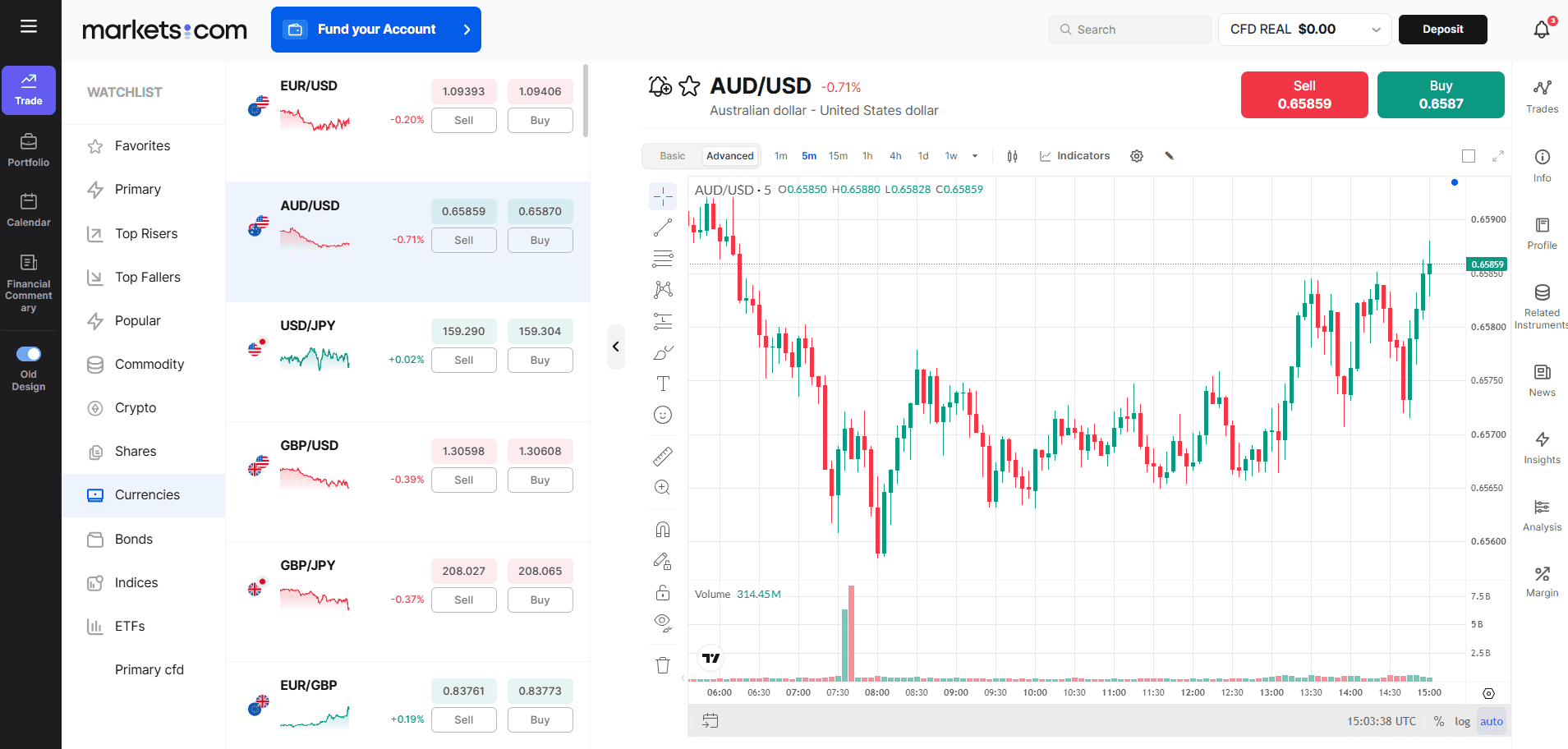
The platform features a modern interface with an option to switch between light and dark themes. Two charting modes are available: Basic and Advanced. Advanced mode uses charts from TradingView.
Key features of Markets Terminal:
- interactive charts with technical indicators and drawing tools from TradingView;
- multiple chart types and timeframes;
- market and pending orders, Stop Loss and Take Profit;
- customizable lists of favorite instruments;
- price alerts;
- built-in economic calendar;
- financial news and analyst commentary;
- market sentiment indicators;
- information on the trading conditions and margin requirements for each instrument;
- management of open positions and access to trading history.
One advantage of Markets Terminal is that it combines trading, analytics and account management in a single interface. The broker's proprietary platform also offers the broadest range of trading instruments.
However, Markets Terminal is less capable than MetaTrader in algorithmic trading: the platform does not support installing Expert Advisors, programming custom indicators or automated strategy testing.
MetaTrader 4
MetaTrader 4 (MT4) is a popular trading platform developed by MetaQuotes and primarily designed for Forex trading. At Markets.com, the terminal is available for Standard, Raw and Micro accounts.
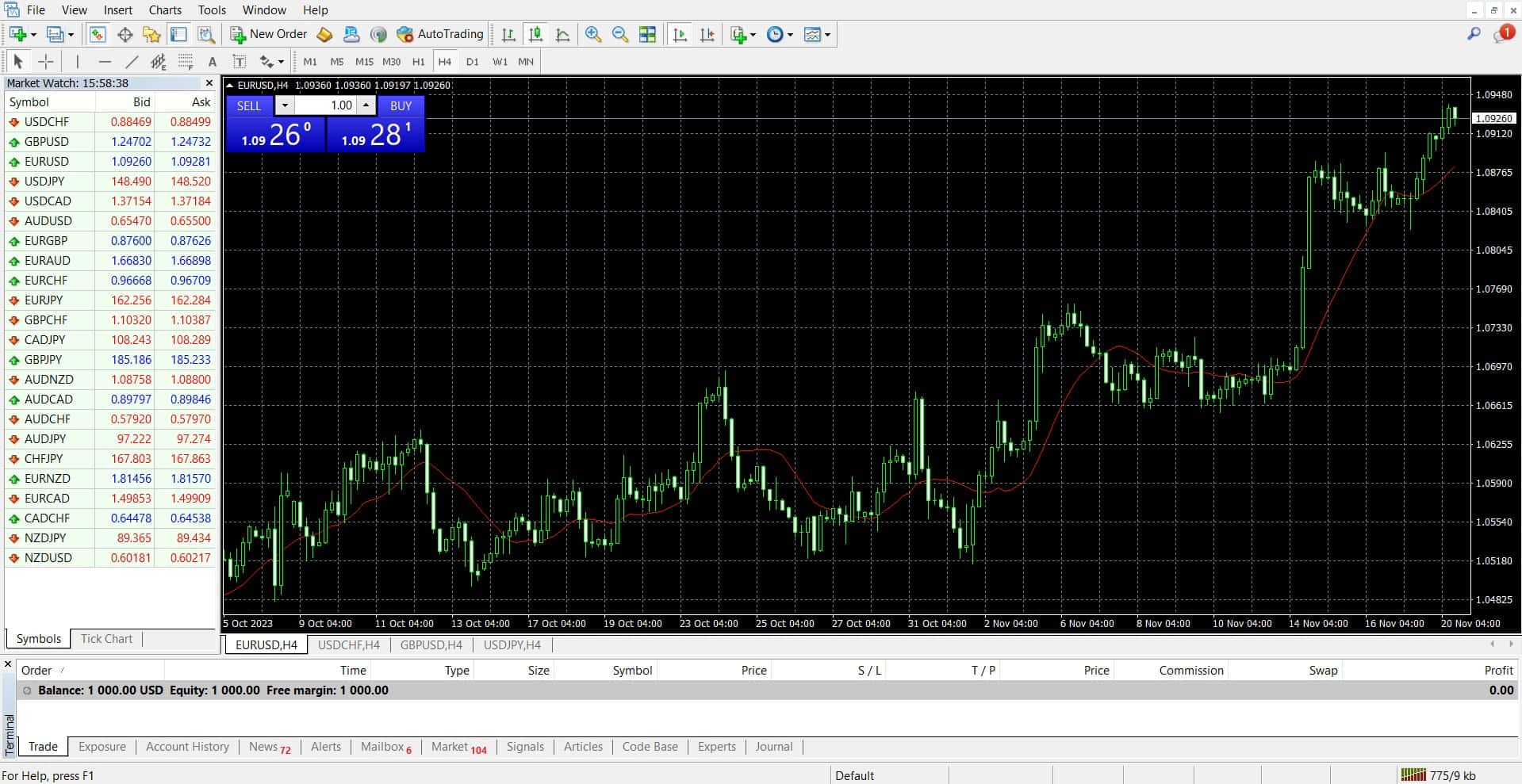
Key features of MetaTrader 4:
- 9 timeframes;
- 30 built-in technical indicators;
- 4 types of pending orders;
- one-click trading;
- hedging support;
- automated trading using Expert Advisors;
- creation of custom indicators and trading robots in the MQL4 language;
- testing trading strategies using historical data.
MetaTrader 4 is suitable for traders who use classic technical analysis, scalping and automated trading strategies. The platform is available in desktop and mobile versions.
Despite its somewhat outdated interface, MT4 remains popular thanks to its extensive library of third-party indicators, Expert Advisors and other trading tools.
MetaTrader 5
MetaTrader 5 (MT5) is a more modern multi-asset platform developed by MetaQuotes, offering advanced technical analysis, order management and algorithmic trading capabilities. Like MT4, the platform is available for Standard, Raw and Micro accounts.
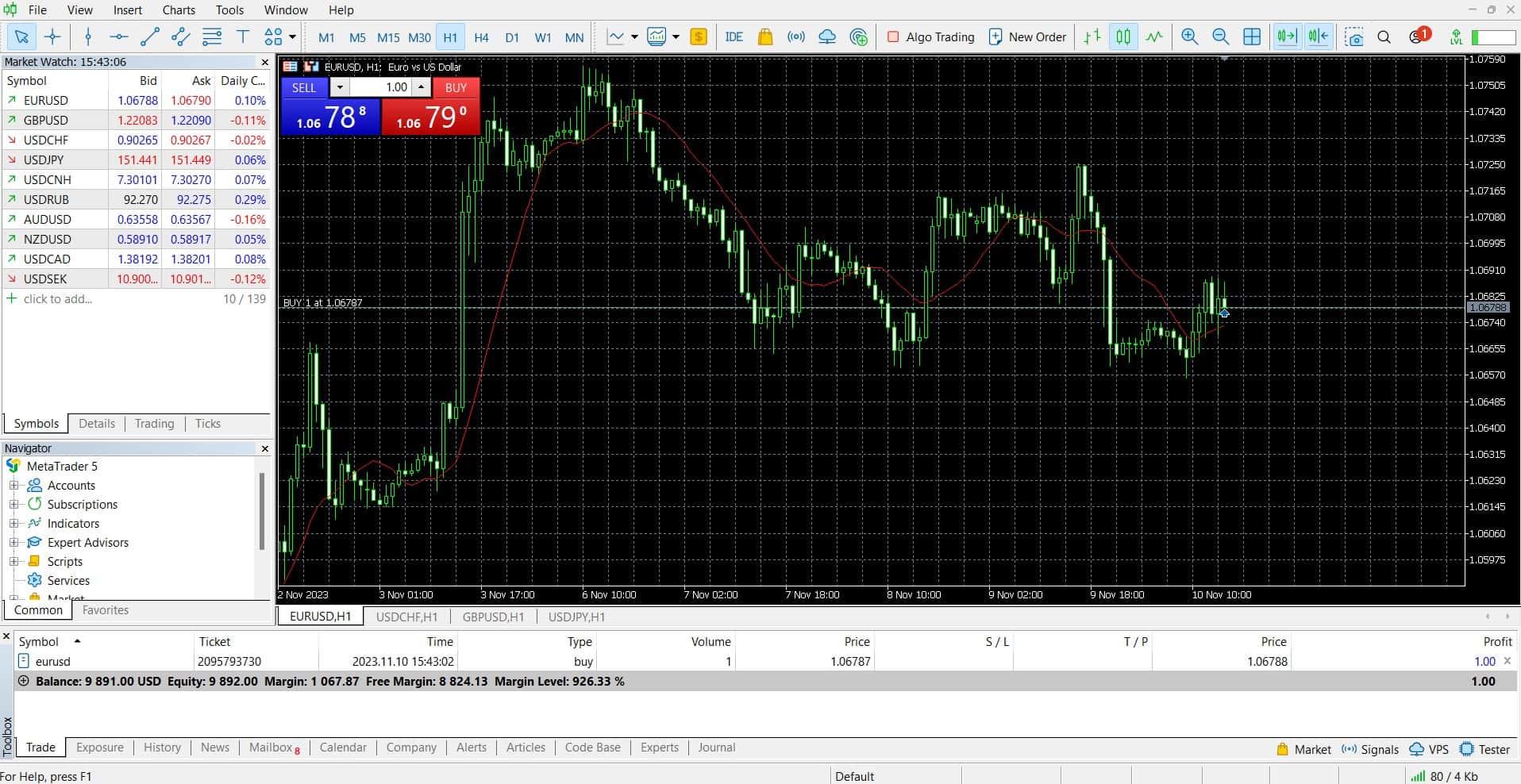
Key features of MetaTrader 5:
- 21 timeframes;
- 38 built-in technical indicators;
- 44 graphical objects;
- 6 types of pending orders;
- Depth of Market;
- built-in economic calendar;
- support for hedging and netting;
- programming trading robots and indicators in the MQL5 language;
- multi-threaded, multi-currency trading strategy tester.
MetaTrader 5 is particularly suitable for experienced traders who need advanced technical analysis tools and the ability to develop and optimize automated trading systems. The platform is available in desktop and mobile versions.
At the same time, the range of trading instruments on MetaTrader accounts at Markets.com is noticeably more limited than on the broker's proprietary platform. The availability of individual terminals and account types may also depend on the jurisdiction serving the client.
Analytics
Markets.com offers a wide range of analytical tools, covering technical and fundamental analysis as well as market sentiment analysis. In addition to its proprietary analytical solutions, the broker partners with Trading Central, one of the leading providers of financial analytics. Most tools are available directly within the trading platform, allowing users to analyze the market without third-party services.
News and market analysis
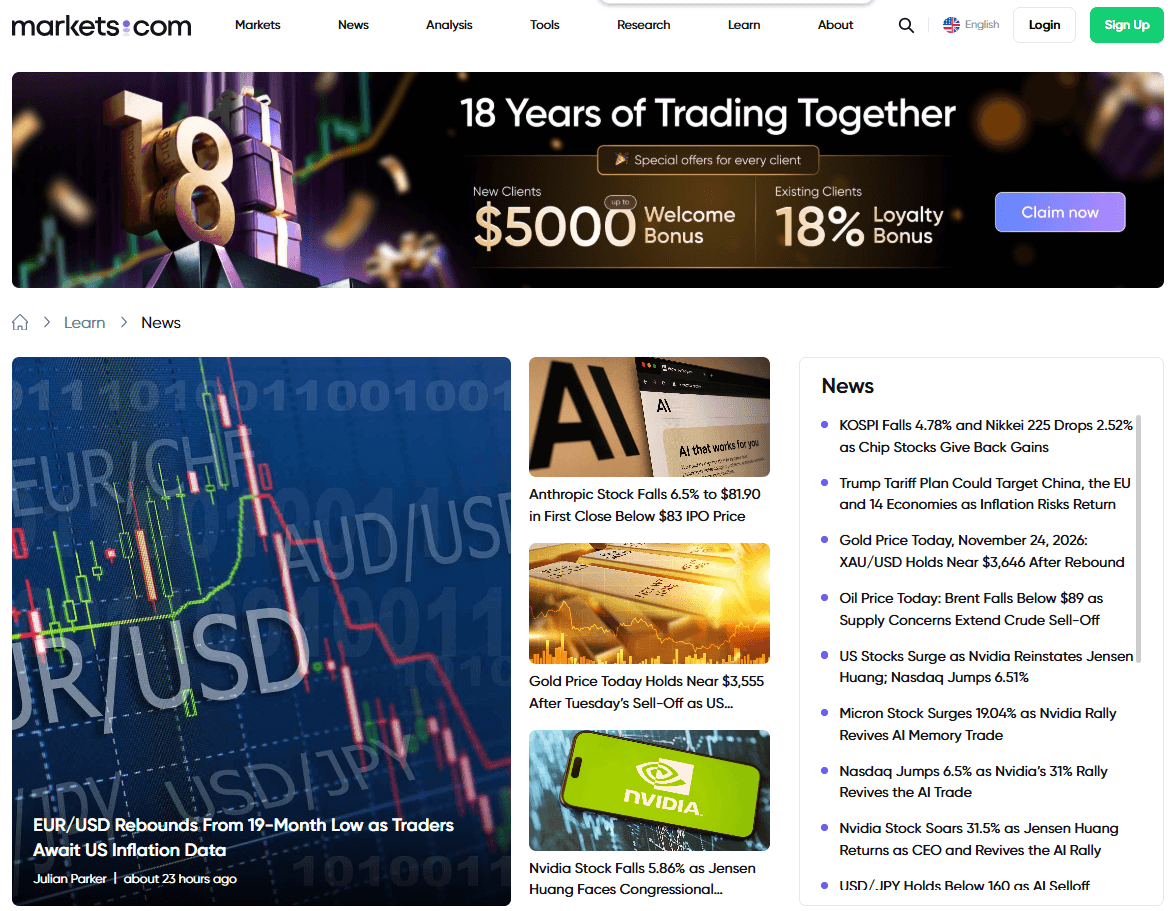
The official website of Markets.com regularly publishes analytical content divided into several categories:
- News — current financial news and events affecting global markets.
- Analysis — analytical reviews, price movement forecasts and commentary on individual financial instruments.
- Research — more detailed research into financial markets, individual companies and investment trends.
The trading platform also includes a customizable news feed that enables traders to follow relevant events and analyst commentary.
Trading Central
Clients of Markets.com gain access to analytical tools from the independent provider Trading Central. The service combines traditional financial market analysis methods with artificial intelligence technology.
Key Trading Central tools:
Tool | Description |
|---|---|
Newsdesk | Real-time financial news from international sources |
Economic Calendar | Calendar of macroeconomic events |
Market Buzz | Analysis of news coverage and market sentiment using artificial intelligence |
Fundamental Insight | Fundamental analysis of financial instruments and identification of trading ideas |
Economic Insight | Analysis of economic events, historical volatility and market reactions to macroeconomic data releases |
Trading Central complements the broker's proprietary analytics and may be of interest to both beginners and experienced traders.
Market sentiment analysis
One of the most notable advantages of Markets.com is its variety of market sentiment analysis tools. The broker enables users to assess not only retail trader positions but also the activity of institutional investors, corporate insiders and professional analysts.
Markets.com states that the following tools are available:
- Hedge Funds Investment Confidence — analysis of hedge fund investment activity based on data from the SEC.
- Analyst Recommendations — recommendations and assessments of financial instruments by professional Wall Street analysts.
- Blogger Insight — analysis of financial bloggers' opinions.
- Insider Trades — information on stock purchases and sales by corporate insiders.
- Traders Trend — a market sentiment indicator based on open positions held by clients of Markets.com.
- Trading Insights — a composite indicator combining data on hedge fund and insider activity, analyst recommendations and financial bloggers' opinions.
These tools are particularly useful for traders specializing in stock CFDs.
Economic calendar
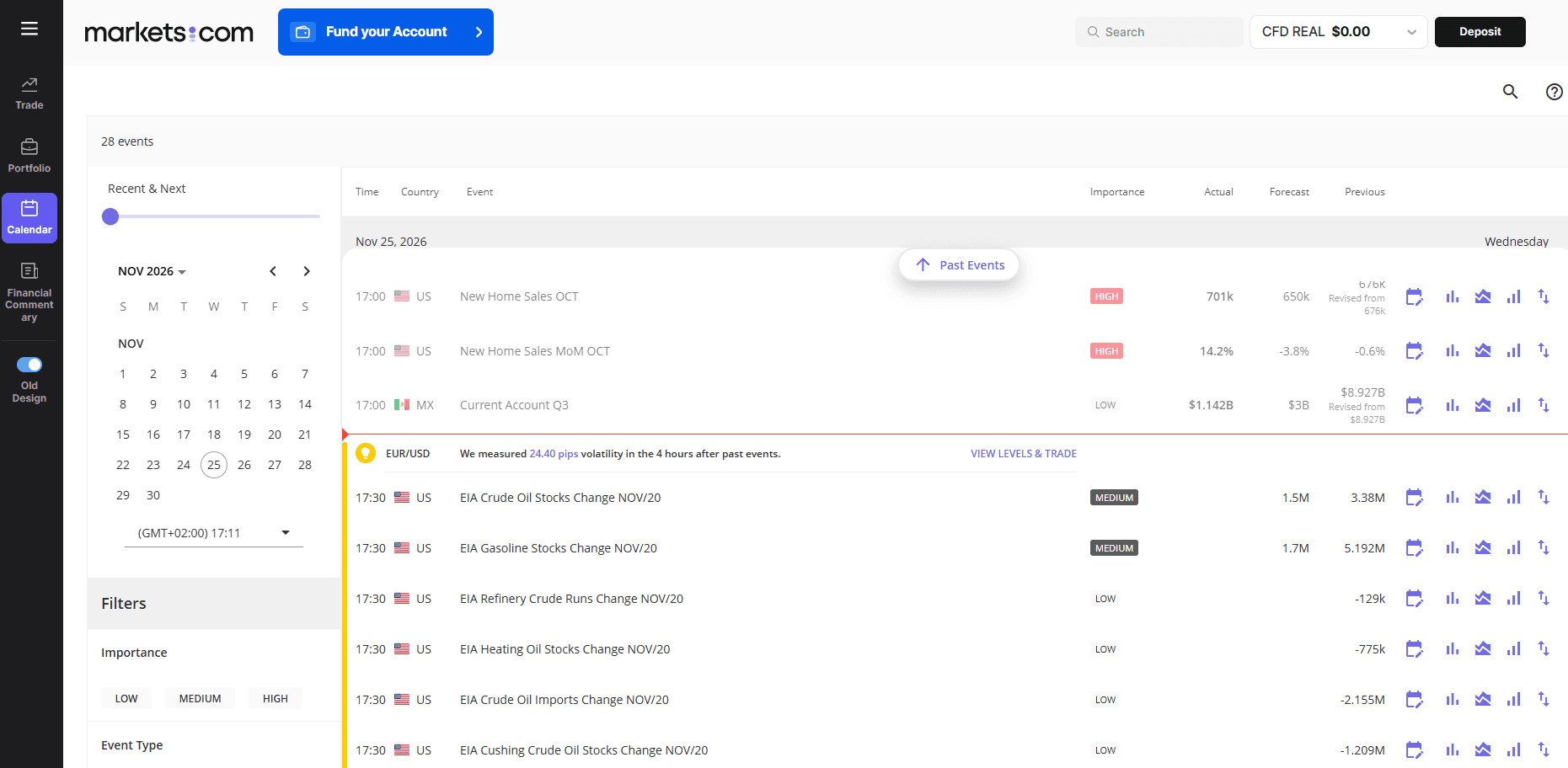
Markets.com provides an economic calendar powered by TradingView, containing information on upcoming macroeconomic events, central bank meetings and economic data releases.
The calendar allows events to be filtered by country and importance and displays previous, forecast and actual values for economic indicators.
Additional analytical tools
In addition to its main analytical services, Markets.com offers several supplementary tools:
- Forex Heatmap — a currency market heatmap for assessing the relative strength and weakness of currencies in real time.
- Related Instruments — a tool for finding related financial assets.
- Trading calculators — calculation of margin requirements, potential profits and losses, and trading costs.
- Price alerts — customizable alerts for price changes.
- Advanced charts — technical analysis tools powered by TradingView.
Education
Markets.com offers a variety of educational materials for traders of different experience levels. The broker's website provides educational articles, practical guides, video lessons, webinars and podcasts. Particular attention is given to trading psychology, risk management and common mistakes made by beginner traders.
Education center
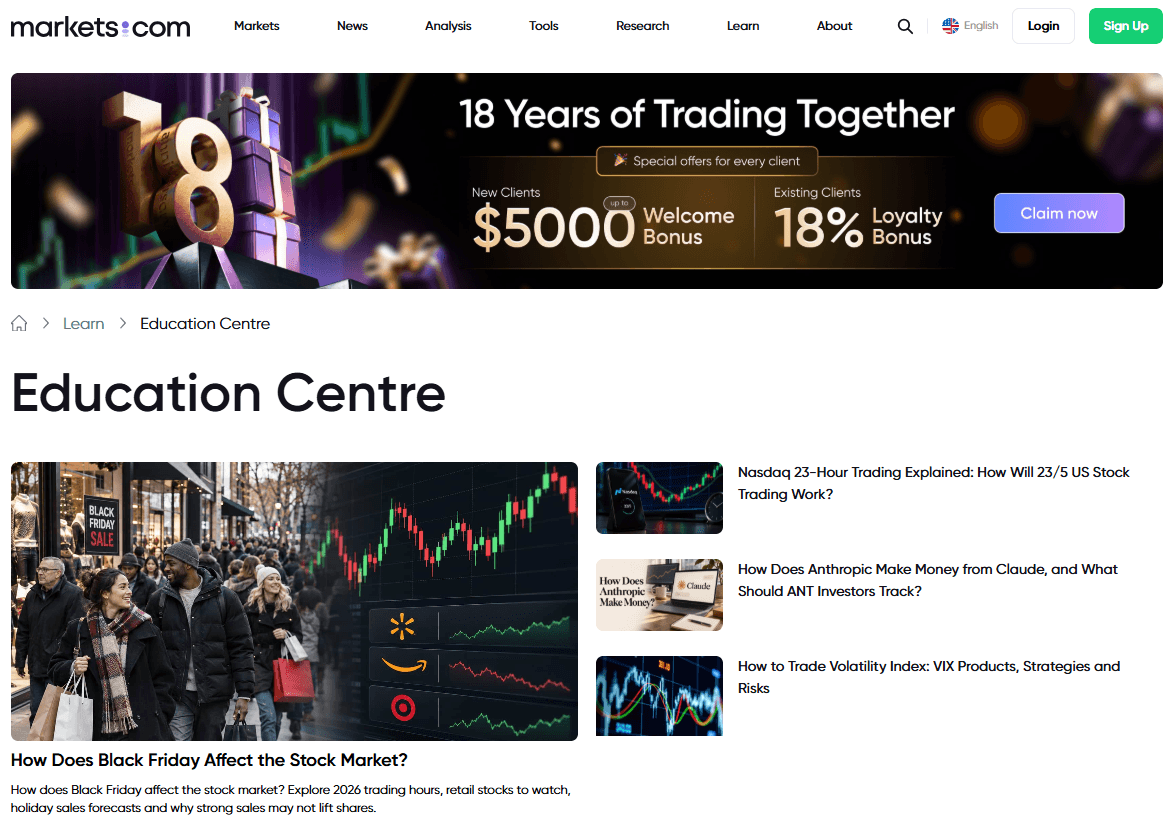
The education center of Markets.com is an extensive library of articles and practical guides covering the following topics:
- the fundamentals of Forex and CFD trading;
- the characteristics of different financial asset classes;
- technical and fundamental analysis;
- trading strategies;
- capital and risk management;
- using trading platforms;
- using technical indicators.
The materials are updated regularly and are suitable for both beginner and experienced traders. Articles are grouped into thematic categories, making it easier to find the necessary information.
Video lessons
Markets.com offers educational videos available on its official website and the broker's YouTube channel.
The video lessons introduce users to how financial markets work, the specifics of trading currency pairs and commodities, the principles of technical analysis and key trading concepts.
The video format is particularly convenient for beginner traders who prefer visual explanations.
Webinars
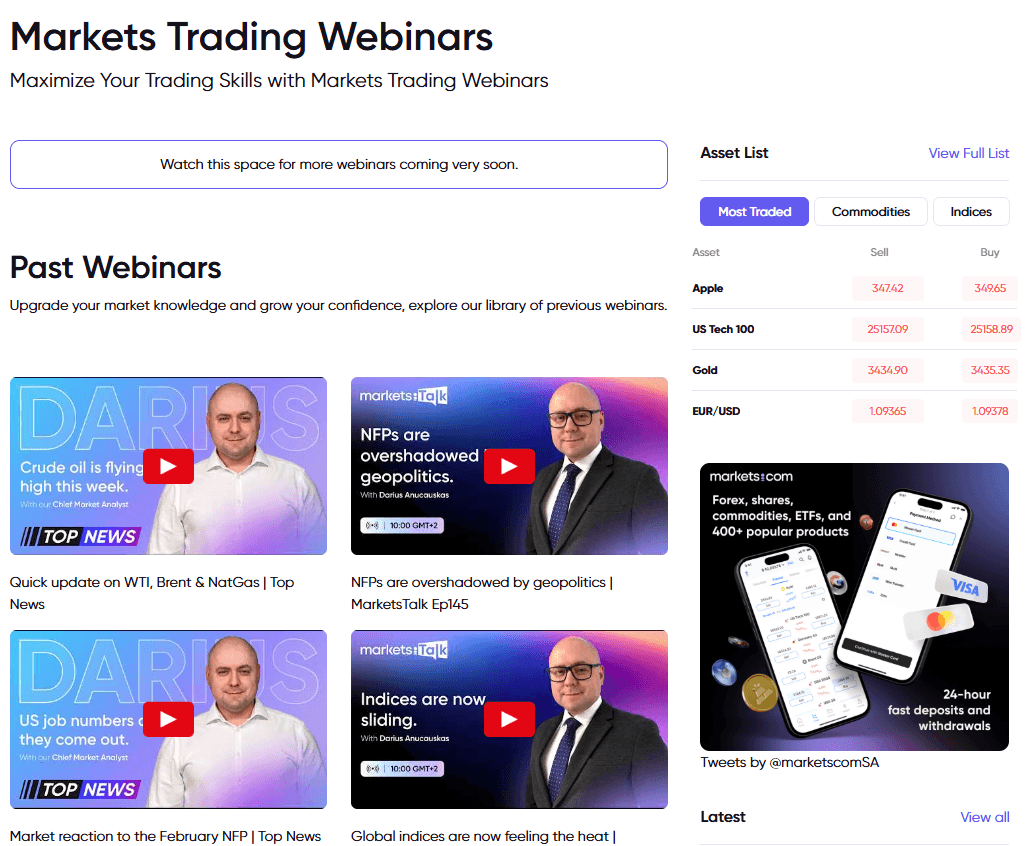
The broker offers a free library of webinars featuring financial market experts. The main webinar topics are:
- analysis of current market conditions;
- trading strategies;
- macroeconomic events and their impact on markets;
- the outlook for individual financial instruments.
Recordings of past webinars are available on the broker's website. However, when this review was prepared, no schedule of upcoming events was available, making it difficult to assess how regularly new webinars are held.
Traders' Clinic
Traders' Clinic is an educational podcast featuring professional traders Charlie Burton and Ali Crooks, dedicated to trading psychology.
The podcast explores the emotional and psychological aspects of trading:
- overtrading;
- fear of losses and missed profits;
- emotional control;
- trading discipline;
- common mistakes made by traders.
Having a separate project dedicated to trading psychology sets Markets.com apart from brokers whose educational materials are limited to technical analysis and the fundamentals of financial markets.
Trader's glossary
The website of Markets.com also features a glossary of trading terms with definitions of key financial concepts. It will be especially useful for beginners who are just becoming familiar with financial markets.
Customer Support
Markets.com offers multichannel customer support in several languages, available around the clock on business days. Clients can contact support agents by phone, email, or live chat. The broker also has a fairly detailed help center that allows users to resolve many common issues themselves.
How to contact support?
Markets.com offers the following ways to contact customer support:
- Live chat — available on the broker's official website.
- Email — support@markets.com.
- International support phone number — +44 208 097 9794.
- South African office phone number — +27 104 470 539.
- Contact form — allows users to submit an inquiry with attached documents and screenshots.
- Callback — an option to request a call from a support agent.
In addition, the website of Markets.com features a help center with answers to common questions about registration, verification, trading conditions, platform operation, and financial transactions.
Support hours
Markets.com customer support is available 24/5 — from 22:00 on Sunday until 22:00 on Friday, London time.
For clients of the South African division, the following language-specific support schedule applies:
Support language | Operating hours (Cyprus time) |
|---|---|
English | 24/5 |
Arabic | 08:00–01:00 |
French | 10:00–19:00 |
Italian | 10:00–19:00 |
Spanish | 09:00–03:00 |
According to the broker, support agents aim to respond to live-chat inquiries within 15 seconds and to emails within two hours. However, actual response times depend on staff workload and the complexity of the inquiry.
Customer support reviews
Customer reviews of Markets.com regarding the quality of customer support are mixed. On the platform Trustpilot, customers posting positive reviews mention prompt responses, friendly staff, and a willingness to help beginner traders.
Negative reviews include complaints about lengthy handling of issues related to financial transactions, some employees' insufficient knowledge of trading conditions, and difficulty obtaining comprehensive answers.
Markets.com Alternatives
Looking for Markets.com alternatives? Compare key features of Markets.com against its competitors.
| Broker |  eToro |  Plus500 | Markets.comCurrent broker |  AvaTrade |  XTB |
|---|---|---|---|---|---|
| Rating | 3.8/5 | 4.3/5 | 4.3/5 | 4.7/5 | 4.2/5 |
| Minimum deposit |
|
|
|
|
|
| Spread | from 1 points | from 0.6 points | from 0.1 points | from 0.6 points | from 0.5 points |
| Trading platforms |
|
|
|
|
|
| Reviews | eToro review | Plus500 review | — | AvaTrade review | XTB review |
| Broker comparison | Markets.com vs eToro | Markets.com vs Plus500 | — | Markets.com vs AvaTrade | Markets.com vs XTB |
If you want to compare Markets.com with other forex brokers in more detail, go to the Forex Brokers Comparison page.
Conclusion
Markets.com is an international Forex and CFD broker with a long operating history, licences from recognized financial regulators, and fairly diverse trading conditions. Its proprietary Markets Terminal trading platform, high-quality analytical support, and extensive educational materials deserve particular attention. Overall, the broker offers a balanced range of services, although its trading costs are higher than those of some competitors.
Markets.com is suitable for both beginners who value a user-friendly trading platform and access to education, and experienced market participants who use technical and fundamental analysis. The broker will be particularly appealing to day traders and traders working with different asset classes. However, traders using long-term strategies or high-frequency trading may find alternatives with lower trading commissions.
FAQ
Is Markets.com legit?
Yes, Markets.com is a legitimate Forex and CFD broker operating since 2008. Its entities are regulated by CySEC in Cyprus and the FSCA in South Africa. The broker also offers segregated client accounts and negative balance protection. However, its offshore entity in Saint Vincent and the Grenadines does not hold a local Forex brokerage licence. The level of regulatory protection therefore depends on the entity with which you open an account.
Which country is Markets.com from?
Markets.com was established in 2008 and has its regulatory roots in Cyprus, where Safecap Investments Limited obtained its CySEC licence. Today, the broker operates internationally through entities registered in Cyprus, South Africa, and Saint Vincent and the Grenadines.
Is Markets.com an ECN broker?
No, Markets.com operates as a Market Maker rather than an ECN broker. According to its Order Execution Policy, the company acts as the counterparty to client transactions and may hedge its market exposure through external liquidity providers. Although Markets.com offers a Raw account with tight spreads and a separate trading commission, this does not make it an ECN account.
How does Markets.com make money?
Markets.com generates revenue primarily through bid-ask spreads, overnight swap fees, and trading commissions on Raw accounts. The broker also charges currency conversion and account inactivity fees. As a Market Maker, Markets.com can hedge its market exposure with external liquidity providers.
Is Markets.com good for beginners?
Yes, Markets.com is a good option for beginners thanks to its user-friendly proprietary trading platform, free demo account, educational articles, videos, webinars, and market analysis tools. However, beginners should be aware of the risks associated with leveraged CFD trading and practise on a demo account before trading with real money.
Does Markets.com offer a demo account?
Yes, Markets.com offers a free demo account that allows traders to practise with virtual funds, explore trading platforms, and test trading strategies without risking real money. Demo accounts are available on Markets Terminal, MetaTrader 4, and MetaTrader 5, subject to regional availability.
How can I open an account with Markets.com?
To open an account with Markets.com, visit the broker's official website, register using your email address, and complete the registration questionnaire. You will need to provide personal and financial information, answer questions about your trading experience, and verify your identity. Once verification is complete, you can fund your account and start trading.
How can I delete my Markets.com account?
To delete your Markets.com account, close all open positions, withdraw any remaining funds, and send an account closure request to account.deletion@markets.com. You can also submit a request through the account deletion page on the broker's website. Certain personal data may be retained to comply with regulatory requirements.
What is the minimum deposit for Markets.com?
The minimum deposit at Markets.com is generally 100 USD, EUR, or GBP. However, the required deposit amount may vary depending on the client's country of residence, payment method, and account conditions.
What is the maximum leverage on Markets.com?
Markets.com advertises maximum leverage of up to 1:1000. However, its standard trading account specifications indicate leverage of up to 1:500. The actual leverage available depends on the financial instrument, trading account, and regulatory jurisdiction. For retail clients in the European Union, Forex leverage is limited to 1:30 on major currency pairs.
How do I deposit funds in a Markets.com account?
To deposit funds, log in to your Markets.com account, navigate to the deposit section, select your preferred payment method, enter the amount, and confirm the transaction. The broker supports bank cards, bank transfers, e-wallets, and cryptocurrencies, depending on your country of residence. Markets.com does not charge its own deposit fees.
How do I withdraw money from Markets.com?
To withdraw funds, log in to your verified Markets.com account, open the withdrawal section, select a payment method, and enter the amount you wish to withdraw. Markets.com does not charge its own withdrawal fees, although third-party charges may apply. Depending on the payment method, funds may arrive within a few hours or take up to seven business days after the broker processes the withdrawal.
Does Markets.com provide VPS?
Markets.com does not advertise a dedicated VPS hosting service for its clients. Traders who wish to run automated trading strategies on MetaTrader 4 or MetaTrader 5 around the clock can use a third-party VPS provider.
Is Markets.com suitable for scalping?
Markets.com is not an ideal choice for scalping. Although its Raw account offers spreads starting from 0.1 pips, the broker's Order Execution Policy identifies scalping and extremely short-duration trades as potentially abusive trading practices. Markets.com reserves the right to restrict trading activity or cancel transactions it considers abusive.
Is Markets.com suitable for auto-trading?
Yes, Markets.com supports automated trading through MetaTrader 4 and MetaTrader 5, allowing traders to use Expert Advisors, custom indicators, and strategy testing tools. However, its proprietary Markets Terminal does not support automated trading, and algorithms that violate the broker's trading policies are prohibited.
Is Markets.com suitable for hedging?
Yes, Markets.com allows hedging on its Standard, Raw, and Micro accounts, enabling traders to hold long and short positions on the same instrument simultaneously. However, coordinated hedging between accounts intended to exploit bonuses, pricing inefficiencies, or negative balance protection is prohibited.
Is Markets.com suitable for spread betting?
No, Markets.com no longer offers spread betting. The broker previously provided this service through its UK entity, Finalto Financial Services Limited, which has since discontinued retail services under the Markets.com brand. The broker currently focuses on CFD trading.